Buy Instagram Live Views

Choose a Live view package for an eligible public Instagram broadcast. Start the stream before placing the order and leave it running during processing.

✓ Public content✓ No password✓ Clear packages✓ Secure checkout
Trusted by 100,000+ customers since 2016 Secure checkout
500 Instagram Live Views package|Choose your amount|

Choose a package. You will confirm the eligible public content on the next step.

50
Live Views
100
17% OFF
200
25% OFF
Popular
500
33% OFF
1,000
36% OFF
2,000
40% OFF
3,000
44% OFF
5,000
33% OFF
You selected500 Live Views
Price
$19.99
🔒 Secure Checkout

Need a quantity not listed? Choose a custom amount.

Choose a Custom Amount

Select Instagram and Instagram Live Views in the existing custom service form, then enter your quantity. Review the calculated order before submitting it.

100,000+ orders · 100M+ engagements delivered since 2016 100K+ orders · 100M+ engagements · Since 2016 Trusted

How to Buy Instagram Live Views

1

Choose a package

Compare the quantities and prices above.

2

Enter the public account

The Story or Live must remain available.

3

Review and pay

Check the order summary at secure checkout.

What this package measures

Live viewers are associated with an active broadcast. A package cannot add viewers to a stream after it ends, and viewer count does not imply comments, follows or watch duration.

Choose the right Instagram service

For a scheduled stream, prepare the broadcast, confirm that the account is public, and order once the Live is active. Use regular video views for a published video instead.

Need a different format? See Instagram Video Views or browse all services.

Go live before placing the order

An active broadcast is the destination for this service. Prepare your title, lighting, connection and opening segment first. Start the Live, make sure it is accessible from the public account, and only then continue with the package. An order placed after the stream ends cannot put viewers into the finished broadcast.

Allow time for delivery

The stream must stay live while the order is processed. Larger packages may need more time, so a five-minute broadcast is a poor fit for a large viewer package. Keep a clear run of show and allow space for late arrivals rather than treating the count as an instant switch.

Know what a Live viewer count means

A viewer count is not a promise of comments, likes, watch duration or sales. Use your own Live Insights after the broadcast to assess how long people stayed and whether the stream generated the actions you wanted. For an uploaded recording or video post, use the regular video-view service instead.

What Instagram says about going live

Instagram’s own Live guide says it “will notify all your followers or Close Friends depending on the audience you select” when you go live, and that you can schedule a Live in advance so people get reminders. It adds that once the video ends, “you can share it on your profile as a reel”. A viewers package works only during the broadcast. Anything that comes after the stream, such as the Reel made from it, is a separate piece of content with its own numbers. Source: Instagram Live Tips and Tricks.

Plan the opening minutes

The start of a Live can be the quietest part, because followers are only now getting the notification. Open with a segment that still works for a small room: say what the stream is about, what is coming and how long you plan to stay. Place the order once the broadcast is stable, and keep going long enough for processing. A stream that ends after five minutes gives neither your followers nor the order enough time.

Before you order

Live fulfilment is time-sensitive. The broadcast needs to remain available long enough for the order to be processed; larger packages can take longer.

Buying a metric can change a displayed count, but it cannot guarantee broader distribution, lasting engagement or sales. Review the result alongside your content quality and the account's own Insights.

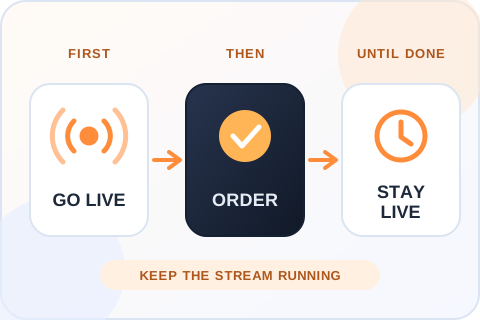
Start the broadcast, then place the order, and keep the stream live while the order is processed. An order placed after the stream ends cannot add viewers.
Go live before placing the orderAn active broadcast is the destination for this service. Start the Live, then order, and keep the stream running while the order is processed. An order placed after the stream ends cannot add viewers.

Plan an Instagram Live Views Order Around the Broadcast

Live viewers are tied to an active stream. Set the session up first, then choose a package that fits the time you can stay on air. Keep the order reference and broadcast time together so support can identify the session if anything needs review.

Start the broadcast before ordering

A scheduled Live announcement is not yet a destination for active viewers. Prepare the account, connection, lighting and opening topic, then start the stream from the public profile. Confirm that another person can open it before continuing to checkout. If the stream is private, unavailable or already finished, the order cannot be directed to that broadcast. Keep the profile name and session details handy so you can identify the right account during the next step.

Allow enough time for the selected package

A larger Live views quantity may take longer to process than a small one. Plan a broadcast with room for arrivals instead of ending a few minutes after payment. A simple run of show helps: introduce the topic, cover the main points, leave time for questions and close with a clear next step. If the event has a hard end time, consider that start times can vary and ask support before placing a time-critical order. Do not read the package as a promise of viewers at an exact minute.

Choose a quantity that matches the event

An intimate Q&A, a product launch and a long demonstration call for different expectations. Think about how many people you can actually address and what you want them to do during the stream. Compare the current package prices and the total before paying. A larger count does not guarantee a busier chat or a stronger sales result. It can also make a short session harder to evaluate if viewers arrive near the end. Choose the amount for the broadcast you will run, not for an imagined future audience.

Keep the stream stable while processing runs

Avoid changing the account, restarting the Live or making the profile private while the order is in progress. If the connection drops, try to restore the session and keep the order reference. The service is associated with an active broadcast; a replay or uploaded recording is a different format. If the broadcast ends unexpectedly, contact support with the time and account details so the order can be reviewed. Reordering immediately may create a second charge without solving the original problem.

Read Live views alongside engagement

Viewer count does not tell you how long people stayed, whether they heard the key message or whether they returned later. Review the stream’s available Insights after it ends, including duration, interactions and any profile actions relevant to your goal. Questions and comments may be more useful to a creator than a peak number by itself. If you ran a promotion, compare orders or inquiries separately. That gives you a realistic account of the broadcast rather than attributing every outcome to one count.

Give late arrivals enough context

People can enter a Live at any point, so a short recap every few minutes helps them follow the discussion. Pin or repeat the main topic, introduce the next demonstration and explain where to find details afterward. A purchased viewer count cannot tell newcomers why the broadcast matters. If the stream is a product event, prepare the item, price and link before going on air. If it is a Q&A, keep the question visible long enough for new arrivals to understand the answer. Better structure makes the session useful regardless of its peak viewer number.

Record the session before interpreting the count

Note the broadcast start and end times, when the order was placed and whether a connection problem occurred. Afterward, compare the available Live Insights with those notes. A peak viewer count and total viewers are different measures, and neither tells you how long each person stayed. If a team member is reporting the result, include the actions that mattered to the event, such as questions, link visits or inquiries, as separate figures. That is more informative than presenting the largest visible number without context.

Use the right service for a finished video

A Live package is for a stream that is currently active. Once you post a recording, it is no longer the same destination. If the plan is to promote the saved video, use an eligible video-post or Reels views service that lets you select that upload. Check the content format and public access before buying anything. At checkout, confirm the account, package quantity and price together. Keep the confirmation in case the timing of the Live needs review later.

Delivery, Safety and Refunds for Instagram Live Views

Live is the one format that can’t wait for an order. This is how the timing works, and what is covered if it goes wrong.

Go live first, then order

Place the order only while the public broadcast is active. A successful payment sends the order into processing, and the stream has to keep running while that happens. Larger packages can take longer.

What the order needs

The public username of the account that is live and an email address for the receipt. That is all. We never ask for your Instagram password, a two-factor code or a recovery email, and nobody at Boost Social Media logs in to your account.

30-day money-back guarantee

If you’re not satisfied with the order, ask for a refund within 30 days of purchase. Support can start the request for you, and the terms are on our Refund Policy page.

If the broadcast ends early

If the stream ends unexpectedly, contact support with the time and the account details so the order can be reviewed. Reordering straight away can create a second charge without fixing the first one. Support is available 24/7.

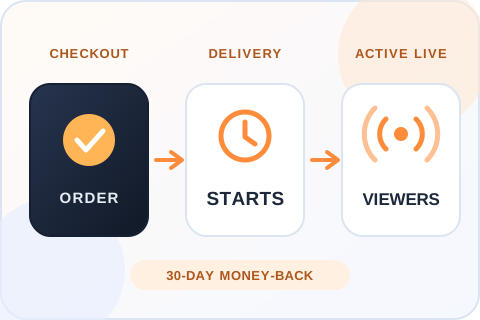
Illustration of three steps: the order is placed while the broadcast is live, processing starts, and viewers join the active stream.
From checkout to the Live viewer countPlace the order while the broadcast is active. A successful payment sends it into processing, and the stream has to keep running while that happens.
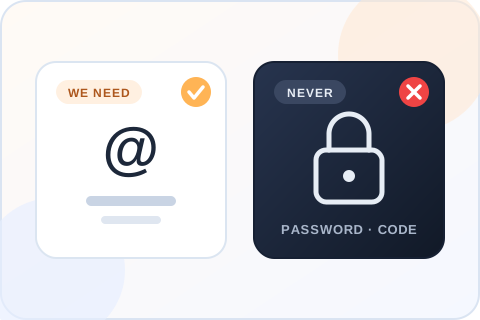
Illustration comparing what the order needs, a public username, with what it never needs, a password or a login code.
What the order needs, and what it never needsThe public username of the account that is live and an email for the receipt. Never a password or a login code.

Questions About Instagram Live Views

Can I order Live views before the broadcast starts?
Choose a package in advance if you like, but place the order only while the eligible public broadcast is active. A finished Live cannot receive active viewers, and a scheduled Live that hasn’t started yet is not a destination either. Go live, confirm the stream opens from another device, then order.
Do you need my Instagram password?
No. The order uses an eligible public account or content and an email address for the receipt. We do not ask for your Instagram password, a login code or a two-factor code, and nobody at Boost Social Media logs in to your account. A seller who asks for any of those is asking for control of the account.
When will the order start?
A successful payment sends the order into processing. Start and completion times vary with service availability, package size and whether the selected content stays public. Delivery is paced, so a large package takes longer to finish than a small one. If nothing has changed and you’re unsure, send support your order number.
Is it safe to buy Instagram Live views?
You never give us your password, so nobody but you can log in, go live or post. The order uses the public username of the account that is streaming. We can’t speak for Instagram and no honest seller can, but an order that needs no account access is the low-risk way to do this.
Can I get a refund?
Yes. If you’re not satisfied, ask for your money back within 30 days of purchase. Support is available 24/7 and can start the request for you, and the terms are on our Refund Policy page. Include your order number so support can find the order.
How much do Instagram Live views cost?
Packages start at $2.99 for 50 Live views and go up to 5,000. Every price is shown in the package grid before you enter a username, and you review the total before paying. Match the size to the length of the broadcast, because larger packages need more time to process.
How long should I stay live?
Long enough for the order to be processed. Larger packages may need more time, so a five-minute broadcast is a poor fit for a large viewer package. No package promises viewers at an exact minute.
Do Live viewers stay after the stream ends?
No. Live viewers belong to an active broadcast. Instagram lets you share a finished Live to your profile as a Reel, and that Reel is a different piece of content with its own view count. The regular video views service is the one that lets you select an upload.
Will Live views guarantee comments or sales?
No. A viewer count is not a promise of comments, likes, watch duration or sales. Use your own Live Insights after the broadcast to see how long people stayed. What keeps people in a stream is what is happening on screen, so plan the content before you plan the package.
How can I pay?
By credit or debit card, Apple Pay, Google Pay, PayPal or crypto. The methods you see at checkout depend on your device and location. Your Instagram password is never part of the payment or the order.
Is there a cheap way to test the service first?
The smallest package is 50 Live views for $2.99. Try it on a short practice broadcast before an event with a fixed end time, so you know how much lead time to leave.
Do my followers get notified when I go live?
Yes, and that part is Instagram’s own feature. Instagram says it notifies your followers, or your Close Friends if that is the audience you chose, when you go live. A viewers package doesn’t send notifications and doesn’t replace them. It adds to the viewer count on the active broadcast.
Is Boost Social Media affiliated with Instagram or Meta?
No. Boost Social Media is an independent service and is not affiliated with, endorsed by or sponsored by Instagram or Meta. We have offered social media services since 2016. For questions about Instagram’s own rules and settings, the right source is Instagram’s Help Center.

Secure Ways to Pay

Available payment options appear at checkout and may vary by device or location.

💳

Cards

Pay using the card options shown at checkout.

Apple Pay

Available on supported Apple devices.

G Pay

Google Pay

Available in supported browsers.

Your Instagram password is never part of the checkout.

About Boost Social Media

Boost Social Media has offered social media services since 2016. We focus on clear packages, a password-free order flow and support when an order needs attention.

More Instagram Services

Choose the service that matches your content format and campaign goal.

Ready to choose Instagram Live Views?

Compare the packages and review your order before payment.

View Packages

We are gathering the necessary information...