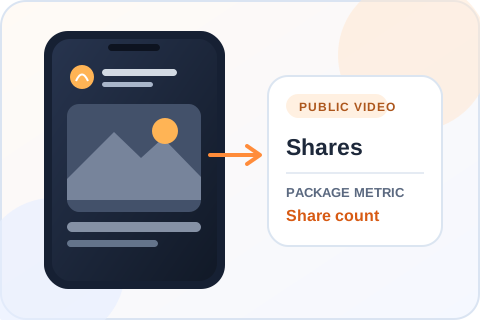
Choose a share package for a public TikTok video, then select the video from your account. The package price is shown before you continue, and no TikTok password is needed.
Reviewed by the Boost Social Media team ·Updated September 2026
✓ Public content✓ No password✓ Clear packages✓ Secure checkout
Trusted by 100,000+ customers since 2016100K+ customersSecure checkout PayVISA₿ Crypto
Clear package pricing
Choose your Shares package
Pick a package or enter an exact amount. You will confirm the TikTok video before checkout.
Custom amounts from 50 to 10,000 are charged at the next package price. Enter an exact amount to see the total.
★★★★★100,000+ orders · 100M+ engagements delivered since 2016100K+ orders · 100M+ engagements · Since 2016Trusted
How it works
From package to checkout
Compare packagesPick a quantity and see its price above.
Enter the accountProvide the public TikTok username you want to use.
Choose the videoSelect the eligible public post and review the order.
Before you order
Shares and referral traffic are different things
A share count records activity on the video. It does not guarantee that someone will open a shared link, visit a website, or become a customer. If your real goal is visits or sales, use those as separate measures when you evaluate the campaign.
Choose a clip that is ready to be shared
Check that the video is public and still available on the account you enter. Make the content understandable to somebody seeing it for the first time: a useful opening and clear context often matter more than the number beside the share icon.
Where the share package goesThe selected video receives the share package; website visits are a separate result.
Buying guide
What a TikTok share count tells you
A share count can be useful to track, but it should not be confused with visits or sales from a shared link.
Give a new viewer enough context
A shared video may reach someone who has never seen your account. Show the topic early and write a caption that stands on its own. A clip that only makes sense after watching an earlier part of a series is harder to understand when it arrives out of context.
Plan how you will measure visits
The number beside TikTok’s share icon does not show how many people opened a link. If traffic matters, check the destination’s own analytics and any tracking link you control. Treat share count and site visits as separate results rather than assuming one implies the other.
Choose the right public post
Keep the account and video public while the order is processed. When the video selector opens, verify the cover and account before paying. If you have a newer edit with a clearer message, select that post rather than an older version just because it has more existing views.
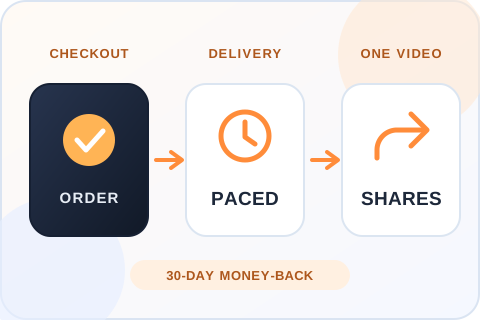
From checkout to the share countDelivery starts within 20 minutes of checkout and is paced, not sent in one burst. If you’re not satisfied, you can ask for your money back within 30 days.
Choosing the right order
Make the selected video easy to understand when shared
Assume the recipient has never seen you
A shared video may be the first thing someone sees from your account. A clear first line, visible subject and caption that stands on its own make the post easier to understand outside your profile. Check the exact video in the selector before you continue.
Measure clicks separately
TikTok share count is not a report of website visitors. If traffic matters, compare it with analytics from the destination you control. A package can change the count shown on the chosen video, but it cannot promise that a recipient will open a link or buy anything.
After you order
Delivery, safety and refunds for TikTok shares
When delivery starts
Delivery starts within 20 minutes of checkout. That is the start, not the finish. Larger packages are paced over a longer window, so the share count climbs and does not jump. Once delivered, the shares don’t drop.
What the order needs
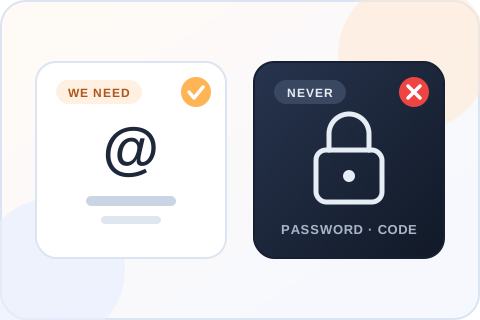
A public username, the video you select and an email for the receipt. No password and no login code. If the video is removed or made private, the order cannot reach it.
30-day money-back guarantee
If you’re not satisfied with the order, ask for a refund within 30 days of purchase. Support can start the request for you, and the terms are on our Refund Policy page.
If the count doesn’t look right
Confirm you’re looking at the video you selected at checkout and allow for processing. If it still looks wrong, send support the order reference and the video link. Support is available 24/7. Please don’t place a duplicate order to fix it.
What the order needs, and what it never needsA public username, the video you select and an email for the receipt. Never a password or a login code.
Practical buying advice
Choose TikTok shares with the destination in mind
A share count is easy to see. What somebody understands or does after receiving the video is a different question.
Make the clip work out of context
A shared video may appear in a chat or feed without the rest of your profile around it. Watch it from that perspective. Does the opening identify the topic? Does the caption explain a detail that the clip leaves out? If the video is part three of a series, a stranger may need more context than a follower does.
Choose a public video that stands alone, then confirm its thumbnail in the selector. If you have a newer cut with a stronger opening or clearer offer, that may be a better target than an older upload with more views. The package affects the selected post, not every version of the idea.
Do not equate shares with traffic
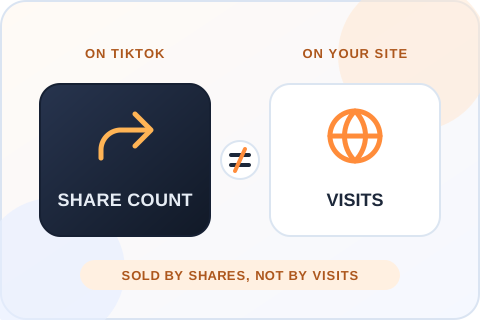
TikTok’s visible share count records an action on the platform. It does not tell you how many recipients opened a link, visited a shop or became customers. A person may share a video privately, send it to a friend or use another route. The package is sold by share quantity, not by website visits.
If your campaign aims to generate traffic, use analytics on the destination you control. Compare those figures with the share count but keep them separate in your report. A share number can be a useful visible metric without proving that a specific business result followed.
Check the target and the total
Select a fixed package or enter an exact whole number through Custom. The in-between amount is priced at the next listed tier; you can see the total before entering the account. Once the username is submitted, select the intended public video and review its details again before payment.
Keep a note of the starting share count and order reference. If the same video is part of another campaign, its public counter may move for more than one reason. A clear baseline makes later questions easier to investigate.
Give people something worth passing on
A useful demonstration, a concise explanation or a moment that invites a reaction is easier to share than a clip that only asks for attention. Give viewers a reason to send the video to a particular person. For example, a practical tip should be understandable without a long sales introduction; a product comparison should show what is being compared.
This is about the creative you publish, not a promise attached to the package. Purchased shares change a visible count. They do not guarantee that recipients will watch, visit a site or pass the clip on again.
Choose the service by the outcome you need
A share package is for the count beside the share action on the selected video. It is not a direct-message campaign, a referral program or a way to assign new website visitors. If you need to learn whether a call to action works, measure it on the page or shop you control. If you only need a visible play count, the views service addresses a different metric.
Keeping those outcomes separate makes reporting more honest. A campaign can show more shares without showing more clicks. That is useful information about the gap between a TikTok interaction and the next step you hoped someone would take.
Review the clip after the order
Once the order is processed, confirm you are looking at the same public video chosen in checkout. Compare the share counter with the baseline you recorded, then note any other promotion that ran during the same period. If the number is unclear, contact support with the order reference and the selected account.
You can also watch how real visitors respond to the clip. Do they ask where a product is available? Do they save it for later? Those actions may tell you what the video communicates. They should be treated as separate observations, not as outcomes guaranteed by the purchased share quantity.
Is it safe to buy TikTok shares?
The order needs a public username, the video you select and an email for the receipt. Nothing else. We don’t ask for your password or a login code, and nobody at Boost Social Media signs in to your account. A seller who asks for those is asking for control of the account, so walk away.
We can’t speak for TikTok, and neither can any other provider. What we control is how the order is handled: shares from real profiles, paced delivery, no access to your account, support that is available 24/7, and a refund within 30 days if you’re not happy with it.
What TikTok says about shares
TikTok’s own post on the For You feed lists the interactions it learns from, and they include “the videos you like or share”. A share is on that list as something a viewer does, and what the system learns from it is that viewer’s taste. The same post says finishing a longer video counts for more than weaker signals.
So a share package cannot promise a place on anyone’s For You feed, and we won’t pretend it can. It changes the number beside the share arrow on one video. Anyone who opens the post can see that number, and it is the only thing the package is sold to change.
A share count is not trafficThe share count records an action on TikTok. It does not tell you how many people opened a link, so measure traffic on the destination you control and keep the two figures separate.
Before you buy
What to check before you buy TikTok shares
Before you pay any seller for TikTok shares, check when delivery starts, whether the shares drop and what the order asks of you. This is our answer on each point, next to the question to put to anyone else.
What matters
Boost Social Media
What to verify elsewhere
Start time
✓Delivery starts within 20 minutes of checkout
Whether a start time is stated before you pay
Drops
✓Delivered shares don’t drop
Whether drops are mentioned, and what happens if they occur
Profiles
✓Shares come from real profiles
Whether the seller says where the shares come from
Video choice
✓You select the exact public video and see its thumbnail before you pay
Whether you control the destination before payment
Claims
✓No promise of clicks, site visits or reach
Whether limits are explained honestly
Password
✓Never required
Whether login access or a verification code is requested
Pricing
✓Every package price is shown before you enter a username
Whether the quantity and total are visible before checkout
Refund
✓30-day money-back guarantee
Whether a refund window is stated in writing
Support
✓24/7 by live chat, WhatsApp and email
How order issues are handled
Reviews
Customer Reviews
No reviews for TikTok Shares yet. Ordered it before? Tell other customers how it went.
Thanks for your order! Send your honest review below and we email you a personal 10% code for your next order.
Customers who write a review from our email get a 10% code for their next order, whatever their rating.
Yes. Shares come from real profiles and are added to the public video you select. They show in the video’s share count like any other share. They are not a promise of clicks, follows or reach, and the package doesn’t tell you where a share was sent. If visits are the goal, measure them on the destination you control.
Is it safe to buy TikTok shares?
You never give us your password, so nobody but you can log in or post. The order needs a public username, the video you select and an email for the receipt, nothing more. Shares are delivered at a paced rate to a public video, with no access to the account. No seller can speak for TikTok, but that is the low-risk way to do this.
Do I need to share my TikTok password?
No. The order uses the public username you enter and the video you select. Do not send a password, a login code or a recovery email to us or to anyone selling shares. A seller who asks for them is asking for control of the account, and no shares service needs that to deliver.
How fast will the shares arrive?
Delivery starts within 20 minutes of checkout. That is the start, not the finish. Larger packages are paced over a longer window, so the share count climbs and does not jump. If the count still hasn’t moved after that, send support your order number and the video link.
Do TikTok shares drop after delivery?
No. Shares delivered through this service don’t drop. Once they are in the video’s share count they stay there, and any shares the video earns on its own come on top. If the count ever looks lower than what you ordered, send support your order number and the video link. Support is available 24/7.
Can I choose the TikTok video?
Yes. Enter your public username and select an eligible video in the next step. You see its thumbnail before you pay, so compare the cover and caption with the upload you mean. The order goes to the exact video you select, and one order covers one video.
Will a share package send traffic to my website?
No. The service is for TikTok shares, not a guaranteed number of link clicks or site visitors. The share count records an action inside TikTok. If traffic matters to you, check the analytics of the page you’re sending people to, and keep that figure separate from the number beside the share icon.
Can I see the cost before entering my username?
Yes. Choose a package above to see its current price before continuing. A Custom amount between two packages is charged at the next package’s price, and that total is also shown before you enter a username or any payment details.
Can I get a refund?
Yes. If you’re not satisfied, ask for your money back within 30 days of purchase. Support can start the request for you by live chat, WhatsApp or email, and the full terms are on our Refund Policy page. Include your order number so support can find the order.
How can I pay?
By credit or debit card, Apple Pay, Google Pay or crypto (10% off with crypto). The options you see at checkout depend on your device and location. You review the total before you enter any payment details, and your TikTok password is never part of the order.
How should I measure visits after a shared video?
Use analytics on the destination you control, and compare them with the TikTok share count separately. A tracking link you create yourself shows which visits came from the video. This package does not provide a report of link clicks, and a rising share count is not evidence that anyone opened the link.
Can I choose which video receives the shares?
Yes. Enter the public TikTok username and select the eligible video in the next step. Confirm its cover before checkout. If you posted a newer edit with a clearer message, pick that one, because a shared clip often reaches people who have never seen the account.
Can I order an exact share count?
Yes. Use Custom for a whole number within the available range. The checkout total follows the next listed package price and is displayed before payment. If the amount you want is close to a listed package, compare the two, because the preset may give you more shares for the same price.
What if I make the video private after ordering?
Keep the selected post public and accessible while the order is active. Changing visibility can interrupt the service and make the result difficult to verify. If you need to remove or hide the video, contact support with the order reference before making assumptions about a replacement target.
How many TikTok shares should I buy?
Pick a number that looks believable next to the video’s views and likes. On most videos the share count sits well below the likes, so look at both before you choose. For a first order, a small package tells you more than a large one, because you can see exactly what changed on a clip you know well.
Is there a cheap way to test the service?
Yes. The smallest package is 50 shares for $0.99, which is enough to see how delivery looks on your own video. Our free trial page also lets you try TikTok views or likes, with one free service every 24 hours.
Is Boost Social Media affiliated with TikTok?
No. Boost Social Media is an independent service and is not affiliated with, endorsed by or sponsored by TikTok. We have offered social media services since 2016. For questions about TikTok’s own rules and settings, the right source is TikTok’s help center.
Can I order an amount between the listed packages?
Yes. Choose Custom in the package grid and enter a whole number within the range shown. The total is the price of the next listed package, so you can see it before entering your TikTok username.
Payment
Secure ways to pay
The payment methods available for your order appear at checkout and may vary by device or location.
▣
Cards
Review the total before entering your card details.
Apple Pay
Use a supported Apple device when this option is shown.
G
Google Pay
Use a supported browser when this option is shown.
Your TikTok password is never part of the order.
About Boost Social Media
We have offered social media services since 2016. Our TikTok pages show the available quantities and prices before you enter an account, and our support team can help if an order needs attention.
FREE TOOLS
Free TikTok Tools
Measure a profile or a post before and after you order. Free, no sign-up.