For an active TikTok LIVE

Buy TikTok LIVE Views

Choose a TikTok LIVE viewers package for the public account that will host the stream. Enter the account carefully and review the package before checkout. No TikTok password is needed.

Reviewed by the Boost Social Media team Updated September 2026

✓ Public content✓ No password✓ Clear packages✓ Secure checkout
Trusted by 100,000+ customers since 2016100K+ customers Secure checkout  PayVISA Crypto

TikTok LIVE Views packages available

Clear package pricing

Choose your Live Views package

Pick a package or enter an exact amount. You will confirm the TikTok LIVE account before checkout.

You selected1,000 Live Views
Price
$89.99$199.80
You save $109.81
Buy Now 🔒 Secure checkout
100,000+ orders · 100M+ engagements delivered since 2016100K+ orders · 100M+ engagements · Since 2016Trusted

How it works

From package to checkout

  1. Compare packagesPick a quantity and see its price above.
  2. Enter the accountProvide the public TikTok username you want to use.
  3. Review the accountCheck the account and package before payment.

Before you order

Plan around the actual live session

LIVE views relate to a stream while it is happening; they are not a permanent audience for later broadcasts. Have the account and timing ready before you order. A good live session still needs a topic, a clear opening, and a reason for viewers to stay.

Check account access and stream status

Use the public username of the broadcaster, not an unrelated video link. Availability and timing can matter more for LIVE than for an ordinary post, so review the current service details and contact support if your stream has a narrow window.

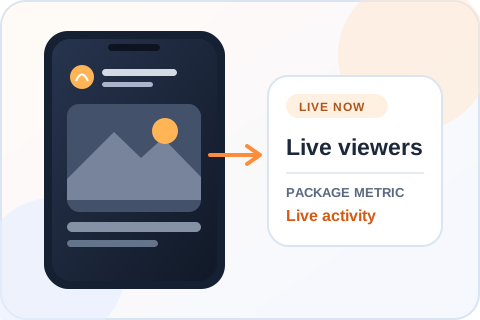
Generic active TikTok LIVE illustration highlighting live viewer activity.
Where the LIVE package goesThe account must be broadcasting when the service is processed.

Buying guide

Plan a TikTok LIVE viewers order

A LIVE order is tied to a broadcast happening now. The timing decision matters as much as the viewer quantity.

Prepare the stream before ordering

Set up the title, connection and opening segment, then start the public broadcast. Confirm from another view that the correct account is live. A recorded video or a stream that has ended is a different destination and cannot receive this LIVE package.

Leave room for processing

Do not place a large order seconds before you plan to end the stream. The broadcast needs to remain active while the service is processed, and timing can vary. If your event has a short fixed window, ask support about suitability before paying rather than relying on an unlisted start-time promise.

Read LIVE results carefully

A viewer count during a broadcast is different from the total views shown afterward. People enter and leave a stream, and the counter can move. Compare the result with the broadcast’s watch time, chat and other available analytics if those matter to your event.

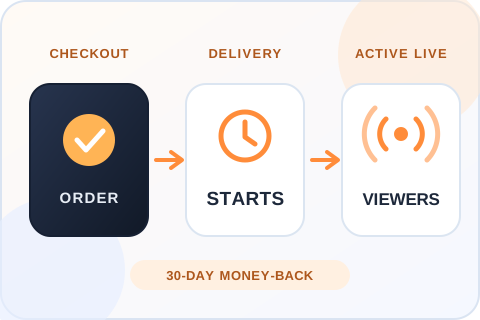
Illustration of three steps: the order is placed while the broadcast is live, processing starts, and viewers join the active stream.
From checkout to the viewer countOrders begin processing shortly after checkout, and the broadcast has to be live while that happens. If you’re not satisfied, you can ask for your money back within 30 days.

Choosing the right order

Order for the broadcast that is actually live

Check the stream first

Start the public LIVE on the account you will enter and confirm that viewers can open it. A finished stream or an uploaded recording is not the same target. Leave enough time in your broadcast for the order to be processed, particularly if the event has a fixed end time.

Know which number you are watching

The audience visible during a LIVE changes as people enter and leave. It is different from a replay view count after the broadcast. Use the active stream and your own LIVE analytics to assess the result. The packages here do not state a fixed viewing duration, so ask support before ordering if duration is essential.

After you order

Delivery, safety and refunds for TikTok LIVE viewers

When viewers start

Orders begin processing shortly after checkout, and the broadcast has to stay live while that happens. Exact start times depend on platform conditions, so treat them as estimates. Don’t order seconds before you plan to end the stream.

What the order needs

The public username of the account that is live and an email for the receipt. No password and no login code. A recorded video or a stream that has ended cannot receive this package.

30-day money-back guarantee

If you’re not satisfied with the order, ask for a refund within 30 days of purchase. Support can start the request for you, and the terms are on our Refund Policy page.

If the stream stops early

Keep the order reference and tell support what happened. Support is available 24/7. Opening a second purchase on another account only makes the order harder to check.

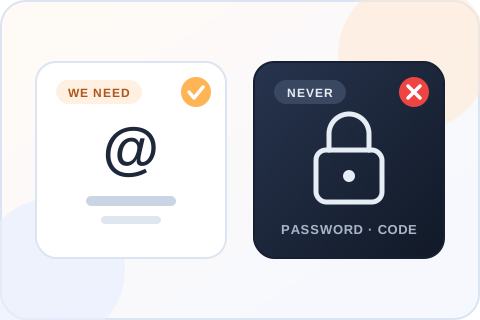
Illustration comparing what the order needs, a public username, with what it never needs, a password or a login code.
What the order needs, and what it never needsThe public username of the account that is live and an email for the receipt. Never a password or a login code.

Practical buying advice

Plan a TikTok LIVE views order around the broadcast

A LIVE session has a start and an end. Make the account, timing and viewer metric clear before buying a package.

Get the stream running first

Set the public account, title and opening segment before placing an order. Check from another device or browser that the intended broadcast is accessible. A recording uploaded later is not the same destination as a LIVE. Enter the broadcaster’s username carefully, especially if a team member is streaming from an account different from the brand’s main profile.

Leave time for the order to be processed while the broadcast is still active. If you plan to end the stream soon or have a short event window, ask support about suitability before paying. No package on this page should be read as a promise that viewers will appear at a precise second.

Know which audience number matters

A LIVE can show viewers who are present at a moment, while post-stream analytics may report a total over the whole broadcast. People enter and leave, so those figures need not match. Before ordering, decide which screen you will use to assess the service and note the account and start time.

The package is for LIVE views on the active broadcast. It does not buy future followers, chat messages or replay views. If a fixed viewing duration is essential to an event, confirm that requirement with support first rather than assuming it from a quantity tile.

Give visitors a reason to remain

Have something happening when new viewers arrive. Demonstrate the product, answer a question, show the next step of a process or introduce the guest. An idle camera, long wait screen or unclear topic gives people little reason to stay, regardless of the number on the counter.

Make the title match what the stream is actually doing. If the broadcast changes direction, explain it aloud for people who join halfway through. Those are decisions you control during the session; the purchase changes the selected viewer metric, not the content of the show.

Review the order after the session

Keep the order reference, broadcast time and any screenshots needed to explain a question to support. The public viewer display can move during the stream, so one screenshot may not tell the whole story. Compare it with your own LIVE analytics, including watch behavior and chat if those measures matter to your goals.

If you run recurring broadcasts, treat each event separately. A package bought for one LIVE does not carry an audience into the next one. Review what people responded to during this session before deciding whether a future order makes sense.

Keep the practical event details together

Before going live, confirm who controls the account, who is watching the chat and when the stream should end. If the broadcast is a product launch or interview, prepare a short introduction for viewers who arrive after the opening. The account username in the order needs to match the broadcaster, not an employee’s personal profile or a recorded-video link.

Test the connection and sound before the event. A viewer quantity cannot fix a stream that is offline or difficult to follow. If the broadcast stops unexpectedly, keep the order reference and tell support what happened instead of opening another purchase on a new account.

Compare LIVE packages by what is listed

The tiles show available viewer quantities and current prices. They do not display a chosen viewing duration or a guaranteed arrival minute. Read the package as it is presented and ask support about any event-critical requirement that the page does not specify. An exact amount can be entered through Custom within the range shown, with the next package price used for an in-between number.

Check the total before entering the username. During the session, remember that concurrent viewers and cumulative audience can be different figures. Use the right counter for your review rather than assuming the package quantity maps to every number in post-stream analytics.

Is it safe to buy TikTok LIVE viewers?

The order needs the public username of the broadcaster and an email for the receipt. Nothing else. We don’t ask for your password or a login code, and nobody at Boost Social Media signs in to your account or touches the stream. A seller who asks for those is asking for control of the account, so walk away.

We can’t speak for TikTok, and neither can any other provider. What we control is how the order is handled: no access to your account, support that is available 24/7, and a refund within 30 days if you’re not happy with it.

LIVE viewers or TikTok Promote?

TikTok’s own advertising tool covers streams too. Its ads help center describes Promote as “an in-app advertising tool to help you amplify your TikTok videos and LIVEs”, and more LIVE views is one of the goals it lists. To promote a LIVE, TikTok says the account needs at least 1,000 followers, and you have to be at least 18. Promote pays TikTok to show the stream to more people, and whether they stay depends on the stream.

A LIVE viewers package sets a quantity for the broadcast that is on air now. It does not advertise the stream to a new audience, and it doesn’t carry over to the next one. If you have the follower count for Promote and a show worth staying for, that is the tool for reach. If the room looks empty in the first minutes of a stream, that is what this page is for.

Test on a rehearsal before the stream that matters

LIVE is the one service here where timing can’t be redone. A video waits for you. A broadcast ends. If the event is a launch, an interview or a sale with a fixed window, the first time you see how an order behaves should not be during that event.

Packages start at $9.99 for 50 viewers. Run a short rehearsal stream, place the smallest order, and watch how the viewer count moves on your own screen. You’ll know how much lead time to leave before the stream that matters, and whether the package size fits the room.

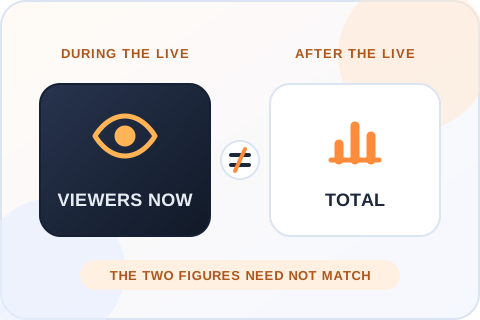
During a LIVE the screen shows the viewers present at that moment. After the stream, analytics may report a total over the whole broadcast. The two figures need not match.
Know which audience number mattersA LIVE shows the viewers present at a moment. Post-stream analytics may report a total over the whole broadcast. Decide which screen you will use to assess the order before you place it.

Questions

About TikTok LIVE Views

Is it safe to buy TikTok LIVE viewers?

You never give us your password, so nobody but you can log in, go live or post. The order needs the public username of the account that is streaming and an email for the receipt, nothing more. No seller can speak for TikTok, but an order with no account access is the low-risk way to do this.

Do I need to share my TikTok password?

No. The order uses the public username of the broadcaster. Do not send a password, a login code or a recovery email to us or to anyone selling LIVE viewers. A seller who asks for them is asking for control of the account, and no LIVE service needs that to deliver.

How fast do LIVE viewers arrive?

Orders begin processing shortly after checkout, and the broadcast has to be live while that happens. Exact start times depend on platform conditions, so treat them as estimates. No package here promises that viewers appear at a precise second. Leave room in the broadcast for processing, and don’t order seconds before you plan to end the stream.

Is this for a recorded TikTok video?

No. This page is for TikTok LIVE viewers on a broadcast that is happening now. A recorded post, a replay or a stream that has ended can’t receive the package. For an uploaded video, use the TikTok video views page, where you select the exact clip in checkout.

Do LIVE views remain after the stream ends?

This package is intended for a live broadcast. The viewers relate to the stream while it is on air, and the package does not promise an audience or a view count on future broadcasts. Treat each LIVE as its own event, and review your LIVE analytics after the session.

What do I enter at checkout?

Enter the public TikTok username of the account that will go live, and confirm it before paying. Use the broadcaster’s handle, not a video link and not a team member’s personal profile. You also give an email for the receipt. No password or login code is part of the order.

Are LIVE viewers the same as video views?

No. LIVE viewer activity belongs to a broadcast in progress, and the number moves as people enter and leave. Video views belong to an uploaded post and stay on its counter. They are separate services here, so choose the one that matches what you’re running: a stream or a clip.

Can I get a refund?

Yes. If you’re not satisfied, ask for your money back within 30 days of purchase. Support can start the request for you by live chat, WhatsApp or email, and the full terms are on our Refund Policy page. Include your order number so support can find the order.

How can I pay?

By credit or debit card, Apple Pay or Google Pay. The options you see at checkout depend on your device and location. You review the total before you enter any payment details, and your TikTok password is never part of the order.

When should I place a LIVE viewers order?

Start the public broadcast first, check from another device that it is accessible, and then order, leaving time for processing while the stream is active. If the event has a very short window, contact support before paying. For an event that matters, run a short rehearsal stream with the smallest package first.

How long will LIVE viewers stay?

The package list shows quantities, not a verified viewing-duration option, and we won’t guess a number for you. If a particular duration is required for your event, contact support before ordering and wait for the answer. A rehearsal stream with the smallest package shows you how the count behaves on your own screen.

What if the broadcast has already ended?

An ended stream is not an active LIVE target, and the package can’t be applied to a replay. If the stream stopped before or during delivery, keep the order reference and tell support what happened. Support is available 24/7. Don’t open a second purchase on another account to make up for it.

How should I read the viewer number during a stream?

The audience present at one moment and the total audience over an entire broadcast are different measures. Viewers can enter and leave while you are live. Decide which display you are checking, keep the stream active and use your own LIVE analytics for any wider review after it ends.

How many TikTok LIVE viewers should I buy?

Match the number to the broadcast. A small stream with a viewer count far above its chat activity looks odd to anyone who joins. For a first order, the smallest package on a rehearsal stream shows you how the count behaves.

Is there a cheap way to test the service?

The smallest package is 50 LIVE viewers for $9.99. Use it on a short rehearsal stream before an event with a fixed window. Our free trial page covers TikTok views and likes, not LIVE viewers.

Is Boost Social Media affiliated with TikTok?

No. Boost Social Media is an independent service and is not affiliated with, endorsed by or sponsored by TikTok. We have offered social media services since 2016. For questions about TikTok’s own rules and settings, the right source is TikTok’s help center.

Can I order an amount between the listed packages?

Yes. Choose Custom in the package grid and enter a whole number within the range shown. The total is the price of the next listed package, so you can see it before entering your TikTok username.

Payment

Secure ways to pay

The payment methods available for your order appear at checkout and may vary by device or location.

Cards

Review the total before entering your card details.

Apple Pay

Use a supported Apple device when this option is shown.

Google Pay

Use a supported browser when this option is shown.

Your TikTok password is never part of the order.

About Boost Social Media

We have offered social media services since 2016. Our TikTok pages show the available quantities and prices before you enter an account, and our support team can help if an order needs attention.

Ready to choose TikTok LIVE Views?

Compare packages, choose a quantity and review the order before payment.

View packages

We are gathering the necessary information...