
Instagram continues to grow rapidly in 2025, and so does the competition for attention. Whether you manage a personal brand, a small business, or a large marketing campaign, posting consistently is one of the strongest ways to stay visible. However, keeping up with daily posting can be stressful especially when your audience is most active at times that may not fit your routine.
Fortunately, Instagram and Meta now offer built-in scheduling tools that make planning content easier than ever. These tools work smoothly on both computer and mobile devices, allowing you to create posts in advance and let the platform publish them automatically.
In this guide, you’ll learn exactly how to schedule Instagram posts using both the Meta Business Suite on a computer and the Instagram app on your phone. Each step is explained clearly so you can start planning your content with confidence.
Why You Should Schedule Instagram Posts Ahead of Time
Scheduling posts offers more than just convenience; it can completely transform your content workflow and improve your overall strategy.
Save Time Through Batch Creation
Instead of creating content daily, scheduling allows you to batch-create multiple posts at once and set them to publish throughout the week or month. This keeps your feed active without requiring constant attention.
Reduce Daily Posting Stress
Keeping track of post timings can be exhausting. With scheduling, you can prepare everything in advance and let Instagram handle publishing automatically.
Maintain Consistent Posting (Algorithm Advantage)
Instagram’s algorithm favors accounts that post regularly. Scheduling helps you maintain steady activity, which often results in better reach and engagement.
Post at Peak Engagement Hours
Your audience may be most active when you’re busy or offline. Scheduled posts ensure your content goes live at the best possible time for maximum visibility.
Improve Content Quality and Brand Planning
Planning ahead gives you space to refine captions, align visuals with your brand identity, and build a cohesive content calendar.
Requirement: Switch to a Professional Account
Instagram only allows scheduling for Business or Creator accounts. A Professional account unlocks additional insights and publishing tools, making scheduling possible.
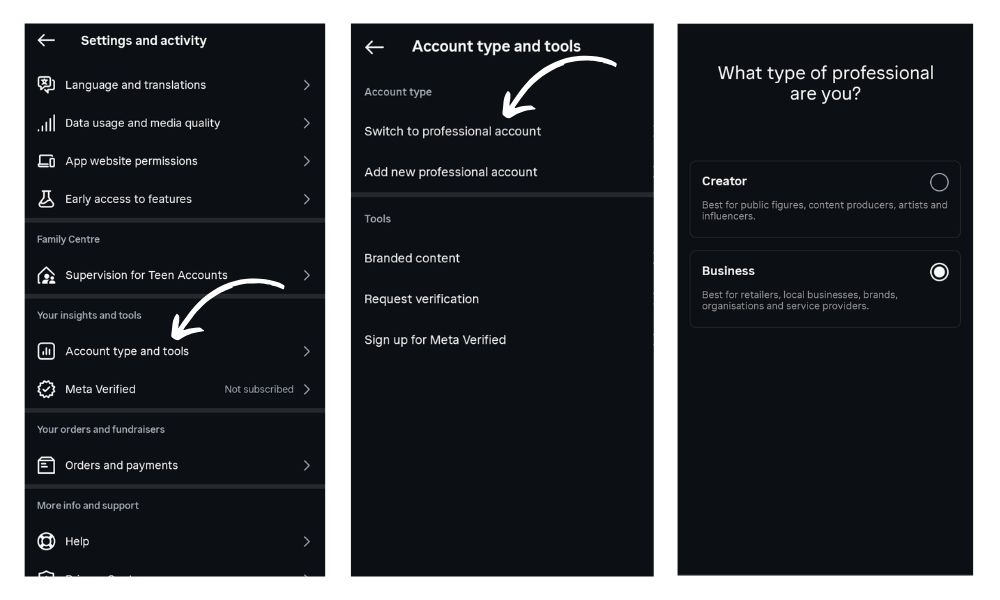
How to Switch to a Professional Account
- Go to your profile and tap the menu (≡) in the top-right corner.
- Tap Settings & privacy.
- Scroll down and select Account type and tools.
- Tap Switch to Professional account.
- Choose between Creator or Business, then follow the prompts.
Switching is free and reversible, and it does not affect your profile content.
How to Schedule Instagram Posts on Computer (Meta Business Suite)
Using Meta Business Suite is one of the easiest ways to schedule Instagram posts on a desktop. It provides a full dashboard for planning, posting, and analyzing content.
Step 1: Open Meta Business Suite
Visit the Meta Business Suite website and log in with the Facebook or Instagram account connected to your page.
Step 2: Go to Content Planner
On the left-hand menu, click Planner or Content Planner. Here you will see a calendar view of your upcoming posts.
Step 3: Create a New Post
Click Create or the + button in the planner. Select Post to begin.
Step 4: Choose Instagram Placement
You can choose to publish on Facebook, Instagram, or both. Select Instagram if you want the post to appear only on your Instagram profile.
Step 5: Add Media and Write Your Caption
Now start building your post:
- Upload photos or videos
- Write your caption
- Add hashtags, mentions, or emojis
- Tag a location
- Adjust your media order if you’re creating a carousel
Step 6: Schedule the Post
After preparing your content:
- Click the dropdown arrow next to Publish
- Select Schedule
- Choose your preferred date and time
- Confirm
Your scheduled post will now appear in the planner calendar, allowing you to review, edit, or reschedule it anytime.
Tips for Scheduling on Desktop
Here are some helpful ways to make the most of Meta Business Suite:
Schedule Stories and Reels
Meta allows scheduling not only for feed posts but also Stories and Reels, which is extremely useful for businesses running campaigns or frequent promotions.
Bulk Upload Media
You can upload several photos or videos to your media library and use them later for future posts.
Use the Calendar View for Better Strategy
The planner shows your scheduled content by day, week, or month. This helps you avoid gaps and maintain a strong posting rhythm.
Experiment With Posting Times
Try posting at different times to see when your audience is most active. Meta’s insights can help you compare results.
How to Schedule Posts on Instagram App (Android & iPhone)
If you prefer scheduling directly through your phone, the Instagram app provides built-in scheduling options for feed posts and Reels.
Step 1: Start a New Post
Tap the + button at the bottom and select your photo or video.
Step 2: Edit Media
Apply your preferred filters, make adjustments, and tap Next.
Step 3: Open Advanced Settings
Before finalizing the post, scroll down and tap Advanced settings.
Step 4: Enable “Schedule This Post”
Toggle on Schedule this post. Then select your desired date and time Instagram allows scheduling up to 75 days ahead.
Step 5: Confirm With the Schedule Button
Finally, tap Schedule. Your post will appear in the “Scheduled Content” section of your profile settings.
Tips for Scheduling on Phone
Drafts Still Work Perfectly
Even when scheduling is available, you can still save drafts to refine later.
Double-Check Your Timezone
If you travel or use a VPN, confirm that your Instagram timezone is correct to avoid unexpected posting times.
Limit of 25 Scheduled Posts Per Day
Instagram currently allows up to 25 scheduled posts a day, which is more than enough for most creators and brands.
Final Words
Scheduling posts on Instagram is one of the most reliable ways to stay consistent and grow your presence in 2025. It reduces the pressure of daily posting, gives you more control over timing, and helps you plan higher-quality content that aligns with your goals.
Whether you prefer using the Meta Business Suite on your computer or the Instagram app on your phone, the tools are simple and efficient. By planning your posts ahead of time, you create space to focus on engagement, creativity, and growth while ensuring your audience always has something fresh to enjoy. Start using scheduling tools today and build a more organized, effective Instagram strategy for the year ahead.