
Instagram Reels service
Buy Instagram Reels Likes for the Reels You Choose
Choose a package, enter the username for a public Instagram account, and select the exact Reels you want to support. You will see the full price before checkout, and we never ask for your Instagram password.
Clear package pricing
Choose Your Instagram Reels Likes Package
Choose a package, or enter a custom amount from 50 to 50,000 likes. On the next step, choose one public Reel or divide the order across several eligible Reels.
Volume savings compare each package with the per-item rate of the smallest package.
Public username only. Review your selected Reels and total before checkout.
Plan the order around your content
What Instagram Reels Likes Can and Cannot Do
Likes add visible engagement to the public Reels you select. They can make the engagement level easier to read when someone lands on the post, especially when the quantity is consistent with the rest of the account.
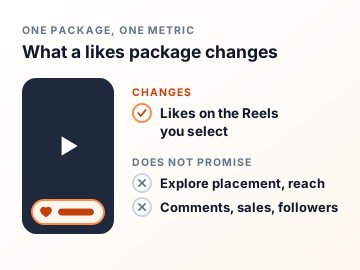
A like package does not control Instagram distribution. It cannot guarantee Explore placement, organic reach, comments, sales, or new followers. The Reel itself still needs a clear opening, useful or entertaining content, and a reason for people to keep watching.
- Select the public Reels before payment
- See the exact package total at every step
- Keep your login and password private
Three clear steps
How to Buy Instagram Reels Likes
Choose a Package
Pick a quantity that matches the account and campaign you are working on.
Select the Reels
Enter the public username, load eligible content, and choose the exact Reels.
Review and Pay
Confirm the quantity, selected content, email, and final price before checkout.
After you order
Delivery, Safety and Refunds for Reels Likes
When the order starts
Likes usually start within 1 to 15 minutes after successful checkout. That is an expected start window, not a guaranteed completion time. Delivery is paced, so a 50,000-like package takes longer to finish than a 50-like one.
What the order needs
Your public username, the Reels you select and an email address for the receipt. Nothing else. We never ask for your Instagram password, a two-factor code or a recovery email, and nobody at Boost Social Media signs in to your account.
365-day refill and 30-day money back
If likes drop within 365 days of delivery, we refill them free of charge. Not satisfied with the order? Ask for a refund within 30 days of purchase. Support can start either request for you, and the refund terms are on our Refund Policy page.
If the like count looks wrong
First make sure you’re looking at a Reel you selected and that the account is still public. If both are right, send support your order number and the Reel link. Support answers 24/7 by live chat, WhatsApp and email. A duplicate order only makes the numbers harder to check.

A practical buying guide
Choose Reels Likes That Fit the Account
Use recent Reels as the baseline
Open several recent Reels and note the usual range. Choose a package that supports the current profile rather than treating the largest number as the default choice.
Support the strongest content first
Start with a Reel that has a clear subject, a strong opening, and a useful reason to watch or respond. The package works best when viewers can understand the Reel quickly.
Keep the account public
The username and selected Reels must remain publicly accessible while the order is processed. Check the spelling before continuing so the right account loads.
Review every allocation
If you divide a package across several Reels, check the quantity beside each one. The review step is the best place to catch an accidental selection.

Make an informed choice
Before You Choose an Instagram Reels Likes Package
A likes package is most useful when you know which Reel needs attention and what you will measure afterward. These checks make the choice easier.
Choose the Reel before choosing the largest number
Open the Reels you are considering as if you had never seen the account. Which one tells a complete story without relying on the caption or an earlier part? A clear opening, visible subject and useful ending give a new visitor a reason to stay. Compare the usual likes on several recent Reels, then choose a quantity that suits the content you want to highlight. A bigger discount does not make the largest tile the right fit for every account. Compare the total price as well as the unit saving.
Decide whether one Reel or several need the package
After entering the public username, the next step shows eligible content. If the selected quantity can be divided across more than one Reel, the allocation screen shows the minimum each post must receive. Use that limit when deciding how many Reels to include. A campaign might have one strong main clip, or several related clips that deserve separate allocations. Confirm every thumbnail and quantity before payment. Similar covers are easy to confuse, especially when you have published revised cuts of the same video.
Read likes separately from reach
A Reel like changes the visible heart count on selected content. It does not buy watch time, comments, sales or a guaranteed place in Instagram recommendations. Save the starting count and order reference so you can review the right Reel later. If you also want to know whether the clip held attention, look at the video insights available to your account. A post can have a healthy like count while viewers still leave early. Use that observation to improve the next edit instead of treating a larger order as a substitute for a clearer opening.
Check the final allocation before payment
The order summary brings the quantity, selected Reels and total together. Read those details as a set. If a Reel is missing, a thumbnail looks wrong or an allocation is smaller than intended, go back and correct it before paying. Keep the account and content public while the order is processed, and save the confirmation afterward. This is especially useful when several people manage the account or a campaign uses near-identical edits. It prevents a simple selection mistake from becoming a support request.
Check the play count before you choose a likes package
Every like starts with a play, so the two numbers on a Reel are read together. A Reel with 400 plays and 2,000 likes can’t be explained. A visitor sees the play count on your Reels tab and the like count on the Reel itself. Look at the plays first and pick a likes quantity that sits comfortably below them. If the plays are low as well, a Reels views order is a separate service you can place for the same Reel, and it makes sense to settle that number first. Neither package includes the other, and the order summary shows exactly which metric you are buying.
Where the like count shows, and when it doesn’t
The Reels tab on your profile prints the play count on each cover. The like count appears once someone opens the Reel, next to the heart. So likes speak to the person who is already watching. One thing to check first: Instagram lets you hide like counts on your own posts. In its 2021 announcement it described the option as a way to make sure “others can’t see how many likes your posts get”. If the count is hidden on the Reel you select, the likes still arrive, but visitors won’t see the number. Decide whether that matters before you pay.
Is it safe to buy Instagram Reels likes?
The order needs your public username, the Reels you select and an email for the receipt. We don’t ask for a password or a login code, so nobody but you can sign in, post or change anything. We can’t speak for Instagram, and neither can any other seller. What we control is how the order is handled: likes from real profiles, no account access, a review step before you pay, a 365-day refill if likes drop, support that answers 24/7, and a refund within 30 days if you’re not happy with it. If a provider asks for your password, it is asking for control of the account. Close the tab.
What Instagram says about likes on Reels
Adam Mosseri, the head of Instagram, wrote that Reels are ranked by predictions about each viewer: how likely that person is to reshare a reel, “watch a reel all the way through”, like it, or open the audio page. A like is on that list as something the system predicts a viewer will do. It is not a counter the system reads off the post. His signals start with the viewer’s own activity and their history with the account, and information about the reel, including its popularity, comes third. A likes package changes the heart count people see. It cannot make the next viewer like the Reel, and it cannot promise a place in recommendations.

Choose the metric that matches the goal
Reels Likes, Views, Shares, or Followers?
| Service | What changes | Use it when |
|---|---|---|
| Reels likes | Visible likes on selected public Reels | You want to support visible engagement on specific content |
| Reels views | View count on selected public Reels | You want a defined number of views on specific videos |
| Instagram shares | Share activity on selected public posts | You want to support the distribution signal around chosen content |
| Instagram followers | Follower count on the public profile | Your goal concerns the profile rather than one Reel |
These services affect different metrics. None of them guarantees an algorithmic result. Choose the one that matches the measurement you actually want to change.
Buying Instagram Reel Likes With a Clear Plan
When you buy Instagram Reels likes, the useful choices are the quantity and the Reels that receive it. This page shows every package up front, then lets you select the public content and review the total before payment.
Compare the likes on several recent Reels before choosing. If most posts sit in a similar range, use that range as a practical starting point. After you enter the public username, select the exact content and check the allocation before continuing.
For a broader content plan, compare Instagram post likes for feed posts and Instagram Reels views for video view counts. The free public-profile tools can help you review current account data before choosing a service.
Packages start at $0.99 for 50 likes and run up to 50,000. Custom takes any whole number from 50 to 50,000, and an amount between two packages is charged at the next package’s price, so you see the total before you continue.
Instagram’s own account of how Reels are ranked is in Instagram Ranking Explained by Adam Mosseri. Read it before you decide what a like count can and cannot do for a Reel.
Reviews
Customer Reviews
No reviews for Instagram Reels Likes yet. Ordered it before? Tell other customers how it went.
Write a Review
Straight answers before checkout
Instagram Reels Likes FAQ
Yes. Likes come from real profiles and are added to the like count of the public Reels you select. They show under the Reel like any other like. They are not a promise of comments, follows or reach. Those are separate actions, and no like count can guarantee them.
You never give us your password, so nobody but you can log in, post or change anything. The order uses your public username and the Reels you select. We can’t speak for Instagram and no honest seller can, but an order that needs no account access is the low-risk way to do this.
No. We do not ask for your Instagram password, recovery email, two-factor code, or account access, and nobody at Boost Social Media logs in to your account. The order uses the public username and the Reels you select. The selected content must be public while the order is processed.
Choose a package and enter the username attached to a public Instagram account. The next step loads eligible public content so you can select the exact Reel or Reels before checkout. You also give an email address for the receipt. No password or login code is part of a Reels likes order.
Yes. You select the eligible public Reel after choosing a package, and you see its thumbnail before you pay. If the order supports several Reels, you can review how the quantity is divided before payment. Similar covers are easy to confuse, so open the Reel you mean in another tab if you’re not sure.
Yes. The selection step can let you choose several eligible public Reels and divide the package quantity. The allocation screen shows the minimum each Reel must receive. Review the split carefully before checkout, because the quantity in the summary is the total for the whole order.
Likes usually start within 1 to 15 minutes after successful checkout. That is an expected start window, not a guaranteed completion time. Delivery is paced, so a large package takes longer to finish than a small one. If the like count hasn’t moved and you’re unsure, send support your order number and the Reel link.
Reels likes carry the same 365-day refill guarantee as our Instagram post likes. If likes drop within 365 days of delivery, we refill them free of charge. Send support your order number and the Reel link, and they will check the count against the order. The refill guarantee is separate from the 30-day money-back guarantee, so you can use either one.
Yes. If you’re not satisfied, ask for your money back within 30 days of purchase. Support answers 24/7 by live chat, WhatsApp and email and can start the request for you, and the terms are on our Refund Policy page. Include your order number so support can find the order. If the problem is a like count that dipped after delivery, the 365-day refill covers that, so mention it to support.
Packages start at $0.99 for 50 likes, and every price is shown in the package grid before you enter a username. Custom accepts any whole number from 50 to 50,000. An amount between two packages is charged at the next package’s price.
Use the current performance of your recent Reels as a reference, and look at the play count of the Reel you have in mind. A measured increase usually looks more consistent with the account than choosing a quantity far above its normal activity. For a first order, a small package on a Reel you know well shows you exactly what changed.
No. Likes are one visible engagement signal. Instagram decides distribution using many factors, so no service can promise Explore placement, organic reach, sales, or follower growth. What the order changes is the heart count a visitor sees when they open the Reel.
They are separate services. This page is for Reels, and the selection step loads the public Reels on your account. For photos and carousels in the feed, use the Instagram post likes page. Choosing the right page matters, because each one loads a different set of content for you to select from.
No. The account and selected Reels need to be publicly accessible while the service is processed. A private or unavailable account cannot be loaded correctly, so the selection step won’t show your Reels. Make the account public before you order and keep it public until delivery has finished.
Check that you’re looking at a Reel you selected at checkout and that the account is still public. Allow for processing, because a large package takes longer than a small one. If it still looks wrong, send support your order number and the Reel link. Support answers 24/7 by live chat, WhatsApp and email.
By credit or debit card, Apple Pay, Google Pay or crypto. The methods you see at checkout depend on your device and location. Your Instagram password is never part of the payment or the order.
Yes. The smallest package is 50 likes for $0.99, which is enough to see how an order looks on your own Reel. Our free trial page also offers 10 Instagram likes on one public post or Reel, with one free service every 24 hours.
Yes, with a separate plan. Instagram Auto Likes covers new public posts for 30 days, up to 60 posts in the plan with no daily limit, and 50 to 12,000 likes per post. It detects a new post within a few minutes of it going live. It is linked near the top of this page.
No. Boost Social Media is an independent service and is not affiliated with, endorsed by or sponsored by Instagram or Meta. We have offered social media services since 2016. For questions about Instagram’s own rules and settings, the right source is Instagram’s Help Center.
Protected checkout
Secure Ways to Pay
Available payment methods appear at checkout and can vary by device or location.
Credit and Debit Cards
Use one of the supported card options shown on the secure checkout screen.
Apple Pay and Google Pay
Use a saved wallet on supported devices and browsers when the option is available.
Crypto
Pay with crypto when it is offered for your device, location and order.
Your Instagram password is never part of the payment or order process.
About Boost Social Media
Boost Social Media has provided social media services since 2016. We focus on clear package details, password-free ordering, protected checkout and support when an order needs review.
Free Instagram Tools
Measure a profile or a post before and after you order. Free, no sign-up.
Review the options
Choose a Reels Likes Package
Select a quantity that fits the account, then choose the public Reels and review the complete order.