
Instagram Reels service
Buy Instagram Reels Views for the Reels You Choose
Choose a package, enter the username for a public Instagram account, and select the exact Reels that should receive the views. You will review the quantity and total before checkout, without sharing a password.
Clear package pricing
Choose Your Instagram Reels Views Package
Choose a fixed package or enter a custom number of views. The next step lets you select one public Reel or split the order across several eligible Reels.
Volume savings compare each package with the per-item rate of the smallest package.
Public username only. Review your selected Reels and total before checkout.
Plan the order around your content
What Instagram Reels Views Can and Cannot Do
Views add to the view count on the public Reels you select. They can help you bring an under-viewed Reel closer to the scale of the rest of your profile or support a new campaign with a defined quantity.
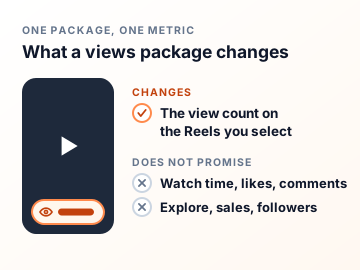
A view package changes one metric. It does not guarantee watch time, likes, comments, shares, Explore placement, sales, or follower growth. Use it alongside content that earns attention on its own.
- Select the public Reels before payment
- See the exact package total at every step
- Keep your login and password private
Three clear steps
How to Buy Instagram Reels Views
Choose a Package
Pick a quantity that matches the account and campaign you are working on.
Select the Reels
Enter the public username, load eligible content, and choose the exact Reels.
Review and Pay
Confirm the quantity, selected content, email, and final price before checkout.
After you order
Delivery, Safety and Refunds for Reels Views
When the order starts
Delivery starts within 20 minutes of a successful checkout. That is the start, not the finish: delivery is paced, so a large package takes longer to finish than a small one. Once delivered, the views don’t drop.
What the order needs
A public username, the Reels you select and an email address for the receipt. That is all. We never ask for your Instagram password, a two-factor code or a recovery email, and nobody at Boost Social Media logs in to your account.
30-day money-back guarantee
If you’re not satisfied with the order, ask for a refund within 30 days of purchase. Support can start the request for you, and the terms are on our Refund Policy page.
If the view count looks wrong
Check that you’re looking at a Reel you selected and that the account is still public. If both are right, send support your order number and the Reel link. Support answers 24/7 by live chat, WhatsApp and email. Please don’t place a second order to push the first one along.

A practical buying guide
Choose Reels Views That Fit the Account
Use recent Reels as the baseline
Open several recent Reels and note the usual range. Choose a package that supports the current profile rather than treating the largest number as the default choice.
Support the strongest content first
Start with a Reel that has a clear subject, a strong opening, and a useful reason to watch or respond. The package works best when viewers can understand the Reel quickly.
Keep the account public
The username and selected Reels must remain publicly accessible while the order is processed. Check the spelling before continuing so the right account loads.
Review every allocation
If you divide a package across several Reels, check the quantity beside each one. The review step is the best place to catch an accidental selection.

Make an informed choice
Plan Your Instagram Reels Views Order
A view total is one number among several in Reels Insights. Decide what the number should mean for this campaign before choosing the package.
Know which view number you want to change
This package is for views on the public Reels you select. Views, reach and watch time answer different questions. A larger play count does not tell you how many distinct people watched or whether they stayed for the whole clip. Before ordering, check the usual view range of several recent Reels and identify the specific post whose visible number matters to your campaign. If your aim is to improve how long people watch, assess the edit and audience in Instagram Insights; watch time is not a result promised by a views quantity.
Plan the allocation before selecting posts
You can choose an eligible Reel after entering the public username and, where the package permits, allocate its quantity across several Reels. The selection screen enforces the minimum for each post. Decide whether you need one focal Reel or a series of related clips before dividing the amount. Check every thumbnail against the public profile. If two Reels have similar covers, open the intended one separately and compare it before checkout. The review step is where you confirm both the content and the exact quantity assigned to it.
Measure the purchase without overstating its effect
Record the public view count of each selected Reel before payment and keep the order reference. Once processing is complete, revisit the same content. Organic viewers, shares and other promotions can also move a public counter, so the final number by itself may not identify every source. Compare watch behavior, replies, follows and visits separately if you want to understand what the video earned from viewers. A views order cannot guarantee Explore placement, sales or an audience for future Reels. Those outcomes depend on more than the visible count.
Keep the campaign and the metric aligned
If you are launching one product Reel, a single target makes a before-and-after comparison easier. If you are supporting a sequence, confirm that the package permits the split and check every allocation. A view count does not tell you whether the video answered a buyer’s question or kept someone watching. Write down the campaign goal before checkout, then compare the purchased view count with the separate actions you hoped the content would earn. That gives you a clearer report and helps you decide what to change in the next Reel.
What a visitor sees on your Reels tab
The Reels tab prints a play count on every cover, so a visitor reads the whole row at once. One Reel at 80,000 between neighbors at 900 stands out for the wrong reason. If the tab is what you want to improve, smaller allocations across the Reels that introduce the account look more natural than one large order on a single clip. Pinned Reels sit first, so start with those. Where the package can be divided, the allocation screen shows the minimum for each Reel, and you can check the split before you pay.
Read views and likes together
Plays and likes are separate counters. A views order raises the first and leaves the second where it was. That is fine if the play count is the number your campaign reports. If the gap between plays and likes on the Reel matters to you, likes are a separate service with their own page, and the two orders can target the same Reel. Record both figures before you pay, so you can tell afterwards what the order changed and what your viewers did on their own.
Is it safe to buy Instagram Reels views?
The order uses public information only: your username, the Reels you select and an email for the receipt. We don’t ask for a password or a login code, so nobody but you can sign in, post or change anything. We can’t speak for Instagram, and neither can any other seller. What we control is how the order is handled: views from real profiles, no account access, a review step before you pay, support that answers 24/7, and a refund within 30 days if you’re not happy with it. A provider that asks for your password is asking for control of the account. Close the tab.
What Instagram says about ranking Reels
Adam Mosseri, the head of Instagram, wrote that Reels are ranked by predictions about each viewer: how likely that person is to reshare a reel, “watch a reel all the way through”, like it, or open the audio page. His list of signals starts with the viewer’s own activity and their history with the account. Information about the reel, including its popularity, comes third. So a view count is one signal among several and not a switch. A views package changes the number people see on the Reel. It does not change how anyone watches, and it cannot promise a place in recommendations.

Choose the metric that matches the goal
Reels Likes, Views, Shares, or Followers?
| Service | What changes | Use it when |
|---|---|---|
| Reels likes | Visible likes on selected public Reels | You want to support visible engagement on specific content |
| Reels views | View count on selected public Reels | You want a defined number of views on specific videos |
| Instagram shares | Share activity on selected public posts | You want to support the distribution signal around chosen content |
| Instagram followers | Follower count on the public profile | Your goal concerns the profile rather than one Reel |
These services affect different metrics. None of them guarantees an algorithmic result. Choose the one that matches the measurement you actually want to change.
Buying Instagram Reel Views With a Clear Plan
When you buy Instagram Reels views, decide which public Reels should receive them and what quantity fits the account. Every package and price is visible here, and the selection step lets you confirm the content before payment.
Review the normal view range across several recent Reels before selecting a package. After entering the public username, choose the exact content and check the allocation. This keeps the purchase tied to a specific campaign and a quantity you can explain.
If visible engagement is the main goal, compare Instagram Reels likes. For feed content, see Instagram post likes or Instagram shares. You can also use the free Instagram tools to inspect public profile data.
Packages start at $0.99 for 100 views. Custom takes any whole number from 100 to 100,000, and an amount between two packages is charged at the next package’s price, so you see the total before you continue.
Instagram’s own account of how Reels are ranked is in Instagram Ranking Explained by Adam Mosseri. It is worth reading before you decide what a view count can and cannot do for a Reel.
Straight answers before checkout
Instagram Reels Views FAQ
Yes. Views come from real profiles and are added to the view count of the public Reels you select. They count like any other view. They are not a promise of likes, comments or reach. Those are separate actions, and no view count can guarantee them.
You never give us your password, so nobody but you can log in, post or change anything. The order uses your public username and the Reels you select. We can’t speak for Instagram and no honest seller can, but an order that needs no account access is the low-risk way to do this.
No. We do not ask for your Instagram password, recovery email, two-factor code, or account access, and nobody at Boost Social Media logs in to your account. The order uses the public username and the Reels you select. The selected content must be public while the order is processed.
Choose a package and enter the username attached to a public Instagram account. The next step loads eligible public content so you can select the exact Reel or Reels before checkout. You also give an email address for the receipt. No password or login code is part of a Reels views order.
Yes. You select the eligible public Reel after choosing a package, and you see its thumbnail before you pay. If the order supports several Reels, you can review how the quantity is divided before payment. Similar covers are easy to confuse, so open the Reel you mean in another tab if you’re not sure.
Yes. The selection step can let you choose several eligible public Reels and divide the package quantity. The allocation screen shows the minimum each Reel must receive. Review the split carefully before checkout, because the quantity in the summary is the total for the whole order.
Delivery starts within 20 minutes of a successful checkout. That is the start, not the finish. Delivery is paced, so a large package takes longer to complete than a small one. If the view count still hasn’t moved after that, send support your order number and the Reel link.
No. Views delivered through this service don’t drop. Once they are in the Reel’s play count they stay there, and any plays the Reel earns on its own come on top. If the count ever looks lower than what you ordered, send support your order number and the Reel link. Support is available 24/7.
Yes. If you’re not satisfied, ask for your money back within 30 days of purchase. Support answers 24/7 by live chat, WhatsApp and email and can start the request for you, and the terms are on our Refund Policy page. Include your order number so support can find the order.
Packages start at $0.99 for 100 views, and every price is shown in the package grid before you enter a username. Custom accepts any whole number from 100 to 100,000. An amount between two packages is charged at the next package’s price.
Compare the package with the normal view range on your recent Reels, and look at the covers around it on your Reels tab. A quantity close to the account’s current scale is easier to use as part of a measured content plan. For a first order, a small package on a Reel you know well shows you exactly what changed.
No. A view count is one performance metric. It does not guarantee likes, comments, watch time, Explore placement, sales, or follower growth. What the order changes is the play count a visitor sees on the cover of the Reel. How people respond to the clip is still up to the clip.
No. A view count and watch time measure different things. This package is for views on the Reels you select. It does not promise a watch-time target, and Instagram Insights is where you check how long people stayed.
No. The account and selected Reels need to be publicly accessible while the service is processed. A private or unavailable account cannot be loaded correctly, so the selection step won’t show your Reels. Make the account public before you order and keep it public until delivery has finished.
Check that you’re looking at a Reel you selected at checkout and that the account is still public. Allow for processing, because a large package takes longer than a small one. If it still looks wrong, send support your order number and the Reel link. Support answers 24/7 by live chat, WhatsApp and email.
By credit or debit card, Apple Pay, Google Pay, PayPal or crypto. The methods you see at checkout depend on your device and location. Your Instagram password is never part of the payment or the order.
Yes. The smallest package is 100 views for $0.99, which is enough to see how an order looks on your own Reel. Our free trial page also offers 100 Instagram views on one public post or Reel, with one free service every 24 hours.
Yes, with a separate plan. Instagram Auto Views covers new public Reels and video posts for 30 days, up to 60 videos in the plan, with a per-video range you choose, and it does not renew automatically. It detects a new video within a few minutes of it going live. It is linked near the top of this page.
No. Boost Social Media is an independent service and is not affiliated with, endorsed by or sponsored by Instagram or Meta. We have offered social media services since 2016. For questions about Instagram’s own rules and settings, the right source is Instagram’s Help Center.
Protected checkout
Secure Ways to Pay
Available payment methods appear at checkout and can vary by device or location.
Credit and Debit Cards
Use one of the supported card options shown on the secure checkout screen.
Apple Pay and Google Pay
Use a saved wallet on supported devices and browsers when the option is available.
PayPal and Crypto
Choose either option when it is offered for your device, location and order.
Your Instagram password is never part of the payment or order process.
About Boost Social Media
Boost Social Media has provided social media services since 2016. We focus on clear package details, password-free ordering, protected checkout and support when an order needs review.
Review the options
Choose a Reels Views Package
Select a quantity that fits the account, then choose the public Reels and review the complete order.