
Instagram Collab Posts: How to Invite and Accept
An Instagram Collab post lets you publish one piece of content with another account listed as a coauthor. The original creator sends an invitation; the other account accepts it. The post can then appear on the collaborator’s profile and be shared with their followers.
That makes Collabs useful when two people contributed to the same tutorial, product demonstration, or event. Visitors can see who made it, and the discussion stays around one post. Before publishing, agree who will create that post and who will handle the responses.
How to invite a collaborator
For a new Feed post, prepare your photos or videos and caption in the Instagram app. Follow the invitation route in Instagram’s Collabs instructions before you publish:
- Open Tag people on the posting screen.
- Choose Invite collaborator.
- Search for the partner’s account and select the correct username.
- Tap Done, check your caption and selected account, then publish when ready.
Check the handle carefully, especially when a business has separate store, founder, and regional accounts. Tell your partner which account should receive the invitation and when to look for it. Sending an invite does not mean the collaboration is active.
Instagram currently allows up to five collaborators on a post. You do not need to use every available slot. Choose accounts that contributed something readers can identify, such as the photographer, demonstrator, or organization hosting the event.
How to accept the invitation
The invited account receives a message. Open Messages, select the conversation containing the invitation, tap the collaboration invite, choose Review, then Accept. Read the published caption and inspect the content before accepting credit for it.
After acceptance, check the post from both profiles. Confirm that the collaborator’s username appears as an author and that the shared post is visible where expected. A normal tag or caption mention does not create coauthorship or share the post with the tagged account’s followers.
If your partner has only tagged you, explain that you need a collaboration invitation. Our Instagram tagging guide covers ordinary tags and mentions. Use those when crediting someone is enough; choose a Collab when both accounts should share authorship.
Decide who creates the original post
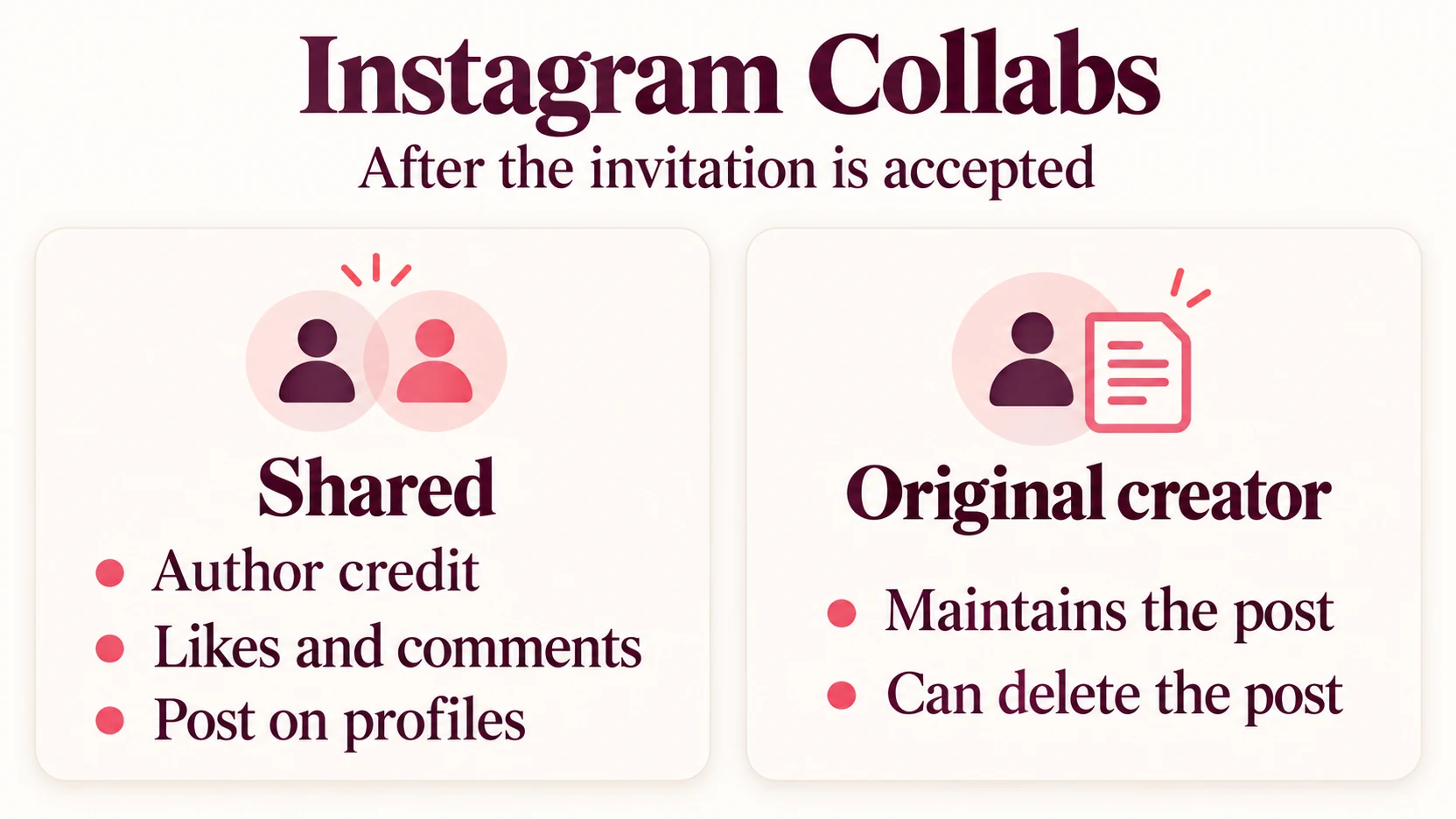
Coauthors share credit, but they do not have identical control. Instagram says the original creator maintains the post and is the only person who can delete it. Deleting the original also removes it from collaborators’ profiles.
A collaborator can leave the collaboration, and the creator can remove a collaborator. In either case, the original post remains on the creator’s profile. This matters when a post needs to remain available after a short campaign ends.
Choose the original account based on who should maintain the content. If a product guide needs corrections when specifications change, the business responsible for those details may be the sensible publisher. If the piece documents a creator’s ongoing series, that creator may be better placed to keep it current.
Keep a copy of the agreed caption and original media outside Instagram, in shared storage. A collaborator’s profile is not a separate backup: if the original creator removes the post, the shared version disappears too. Save the material you may need for future related work.
Both sides can see the post’s likes and comments. Treat those as responses to the shared content, rather than adding the same post’s counts together as though each profile hosted an independent result.
A practical plan for two partners
Imagine a bag maker and a bicycle commuter creating a photo carousel about carrying everyday essentials. The maker explains the compartments; the commuter demonstrates how the bag fits into a daily routine. Their shared subject gives each account a clear reason to participate.
Before building the carousel, they could agree on this simple plan:
- Publisher: the maker creates the original because product details may need updating.
- Content: show the packed bag, explain the choices, and answer one common question about fit.
- Approval: both review the images and caption before the invitation is sent.
- Acceptance: the commuter checks the invitation after the agreed publishing time.
- Replies: the maker answers product questions; the commuter answers questions about daily use.
The final slide could ask, “Which item is hardest to organize in your everyday bag?” That question follows from the demonstration and gives both partners something useful to answer. It is more focused than asking people to like, follow, share, and buy at once.
This is a hypothetical planning example, not a reported campaign. Adapt the roles to your project, and choose a question you can answer after the post goes live.
When the collaboration is missing
Start with the invitation itself. Confirm the intended username, ask the recipient to check the conversation, and verify that they accepted rather than simply viewed the post. Then check whether you used Invite collaborator instead of an ordinary tag.
Account privacy also affects eligibility. Public accounts can invite public or private accounts. A private account can invite either type only when the invited account follows it. If a public account accepts a private creator’s invitation, the post is shared publicly through that collaborator.
Instagram does not support adding collaborators to Stories. For a Story, a mention is a different tool. Keep this distinction in mind if the button you expect is missing: first confirm which format you are creating.
Review the response before the next collaboration
Set a review date with your partner. Read the comments for questions the post answered and questions it missed. A demonstration that earns repeated requests for sizing information suggests a useful follow-up, even when its like count looks encouraging.
Likes make positive reactions visible around a post. If you choose to buy real Instagram likes, our service lets you select the posts to receive likes without sharing your password. Prepare the content and confirm the intended public post first.
Keep any promotion dates beside your review notes. Added likes do not establish that people understood the demonstration or bought the product. Use their questions and subsequent actions to decide what the next collaboration should explain.