
Twitter Impressions: What They Mean and How to Use Them
Your latest post has thousands of impressions, but the workshop you promoted still has empty seats. Before rewriting the offer, check what that number actually measures. Twitter impressions count recorded appearances of a post on X, formerly Twitter. They do not tell you how many different people read it or how many wanted what you offered.
The count is useful when you pair it with a purpose. A teaching post might invite questions; a launch announcement might send readers to a product page. Understanding that difference helps you decide whether to improve distribution, clarify the message, or fix the next step.
What Twitter impressions actually count
According to X’s metric definitions, an impression records a post appearing on a user’s screen. Repeat appearances can count again. That makes impressions different from unique reach, which describes distinct people. You cannot calculate a unique audience by reading the impression total alone.
The public view counter needs similar care. X’s view count guide says logged-in viewers can count whether they encounter a post in Home, Search, or a profile. Your own views count too. Multiple views may count, including viewing a post on the web and then on a phone. Embedded posts do not add to that public counter.
An impression also does not establish careful reading. A post can appear without earning a click, reply, or remembered message. Video views are a separate metric from post impressions, so keep their labels visible when recording results.
For a quick check, look for the public view count beside a post’s analytics icon or in its details. For deeper comparisons, use the metrics available for your own posts. If your reporting tool does not expose link clicks, leave that field blank rather than substituting likes.
Same exposure, different next steps
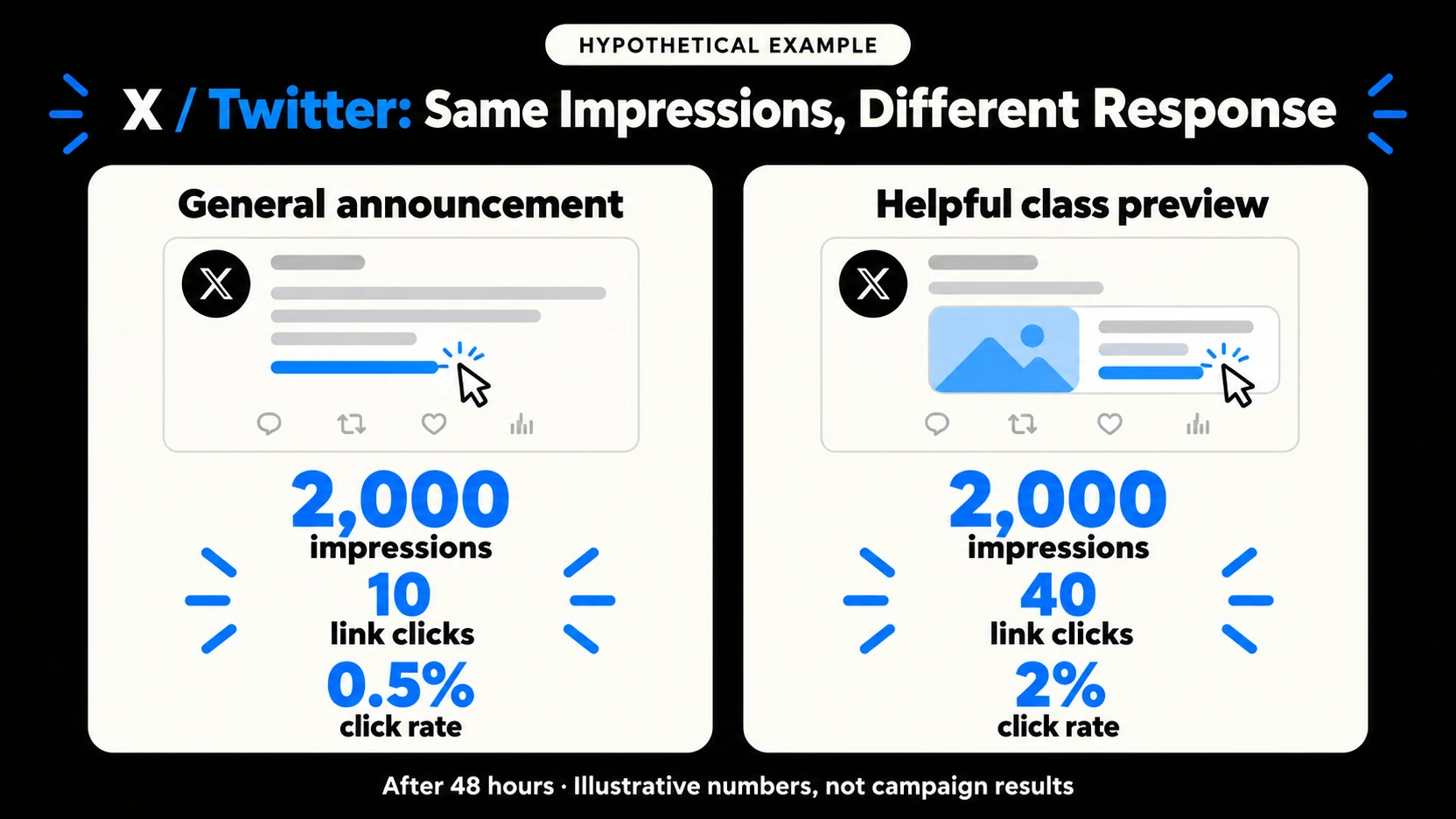
Consider a hypothetical pottery studio promoting beginner workshops. It compares two posts at the same age: 48 hours after publication. Each has 2,000 impressions. These figures illustrate the calculation; they are not customer results.
Post A: general announcement. “Our next pottery workshop is open for booking.” The link receives 10 clicks. That is 10 divided by 2,000, multiplied by 100: a 0.5% link click rate.
Post B: helpful class preview. “Your first pottery class: what you’ll make, what to wear, and how booking works.” The link receives 40 clicks. Using the same calculation gives a 2% link click rate.
For the studio’s goal of sending interested readers to the workshop page, Post B produced more useful action from equal recorded exposure. That makes its practical preview worth testing again. The comparison does not prove that wording caused the difference, that 40 different people clicked, or that anyone booked.
Next, check registrations using the website’s own reporting. If clicks increase but bookings do not, inspect the class page: are the date, location, price, and booking button easy to find? More distribution cannot explain away a confusing destination.
Read the count alongside one meaningful action
Choose the action before judging the post. For an educational thread, specific replies can reveal whether people understood the explanation. For a portfolio post, profile visits or inquiries may matter. For a workshop announcement, link clicks and registrations make more sense than collecting every possible interaction.
Keep that action consistent across comparisons. A click rate divides clicks by impressions; it does not tell you the percentage of unique people who clicked. Likewise, a broad engagement rate can combine actions that serve different purposes. Write down what your numerator includes before comparing numbers from different tools.
A higher impression count also does not automatically raise a rate. If appearances grow while clicks stay flat, clicks per impression fall. That is a reason to investigate the message and audience, not proof that the post failed.
To decide whether a count is good, build a baseline from several recent posts with the same purpose and a similar format. Set aside unusual launches or news spikes when assessing everyday performance. A small local class and a global entertainment account need different comparisons. Keep low-impression posts in the record too: excluding them would hide the distribution problems you are trying to understand. Look for a pattern across repeated attempts before making a larger commitment.
Make the next post easier to act on
Start with a question your intended reader actually has. The studio’s beginner audience may wonder whether experience is required or whether materials are included. Answer one of those questions in the post itself, then explain what the linked page adds.
Use a visual that resolves uncertainty. A photograph of the piece participants will make can communicate more than a decorative announcement graphic. Keep essential details in the text so the image supports the message without carrying every instruction.
Test one substantial change at a time. Compare a practical class preview with another practical preview before declaring a winning format. Record when each post went live and when you checked it. Comparing a week-old announcement with an hour-old tutorial tells you little about which message deserves another attempt.
Where additional visibility fits
A useful post needs opportunities to be noticed. If you plan to buy Twitter impressions for a specific announcement, prepare that post first: give readers a clear reason to care and a working next step. Boost Social Media offers impression packages for individual posts, which can fit a plan focused on additional exposure.
Track the timing of any promotion alongside your results. A change in distribution changes the comparison, so avoid crediting every increase to the wording alone. Assess clicks, relevant conversations, and bookings separately; an exposure total does not establish those outcomes.
A short review before you post again
Save the post link, its purpose, its age when measured, its impressions, and the action you chose. Add one sentence about what you will test next. For the pottery studio, that might be: “Show the finished piece and answer the beginner question before linking to booking.” This small record turns a number into a decision you can revisit. Review these notes once a week.