
12 TikTok Bio Ideas for Creators and Small Businesses
A visitor enjoyed one of your videos and opened your profile. Your bio now needs to answer a small but useful question: what will they find if they stay? Name the subject, make the audience clear, and offer a next step you can deliver.
These TikTok bio ideas are written for creators and small businesses. Use them as starting points, then replace the details with your own. A specific promise, such as phone photography lessons for shop owners, gives someone more information than a line about sharing your passion.
12 short bios to adapt
These original examples describe fictional accounts, so adapt the details to your own work. Choose the closest purpose before editing the wording. Each fits within 80 characters, including spaces and punctuation.
For people who teach a skill
- Phone photo lessons for small shops. Try the window-light demo.
- Guitar practice for busy beginners. One useful chord change at a time.
- Simple sewing repairs. Start with the loose-button lesson.
- Spreadsheet fixes for freelancers. Find your next shortcut.
These bios name something a viewer can learn. Keep the beginner label only if your explanations actually start at that level. If you mention a particular lesson, make it easy to find among your videos.
For businesses offering a service
- Denver bike repairs, explained. Watch a tune-up before booking.
- Product photos for handmade brands. See how a shoot comes together.
- Small-space garden design. Follow a balcony from plan to planting.
- Websites for local services. Watch us fix confusing homepages.
A location helps when customers need to visit you. A customer type helps when you work remotely. Choose whichever detail answers the visitor’s first question, then use the remaining space to describe what your videos show.
For makers and creative accounts
- Refillable desk tools. See how each piece is made and used.
- Small-batch sauces, tested at dinner. Find your next weeknight idea.
- Original piano sketches. Hear the melody become a finished song.
- Secondhand outfits, one repeat-wear challenge at a time.
These examples connect a product or interest to a recurring viewing experience. They work only when that experience matches the account. A maker posting finished products should not promise process videos that have never been filmed.
Turn a vague line into a useful introduction
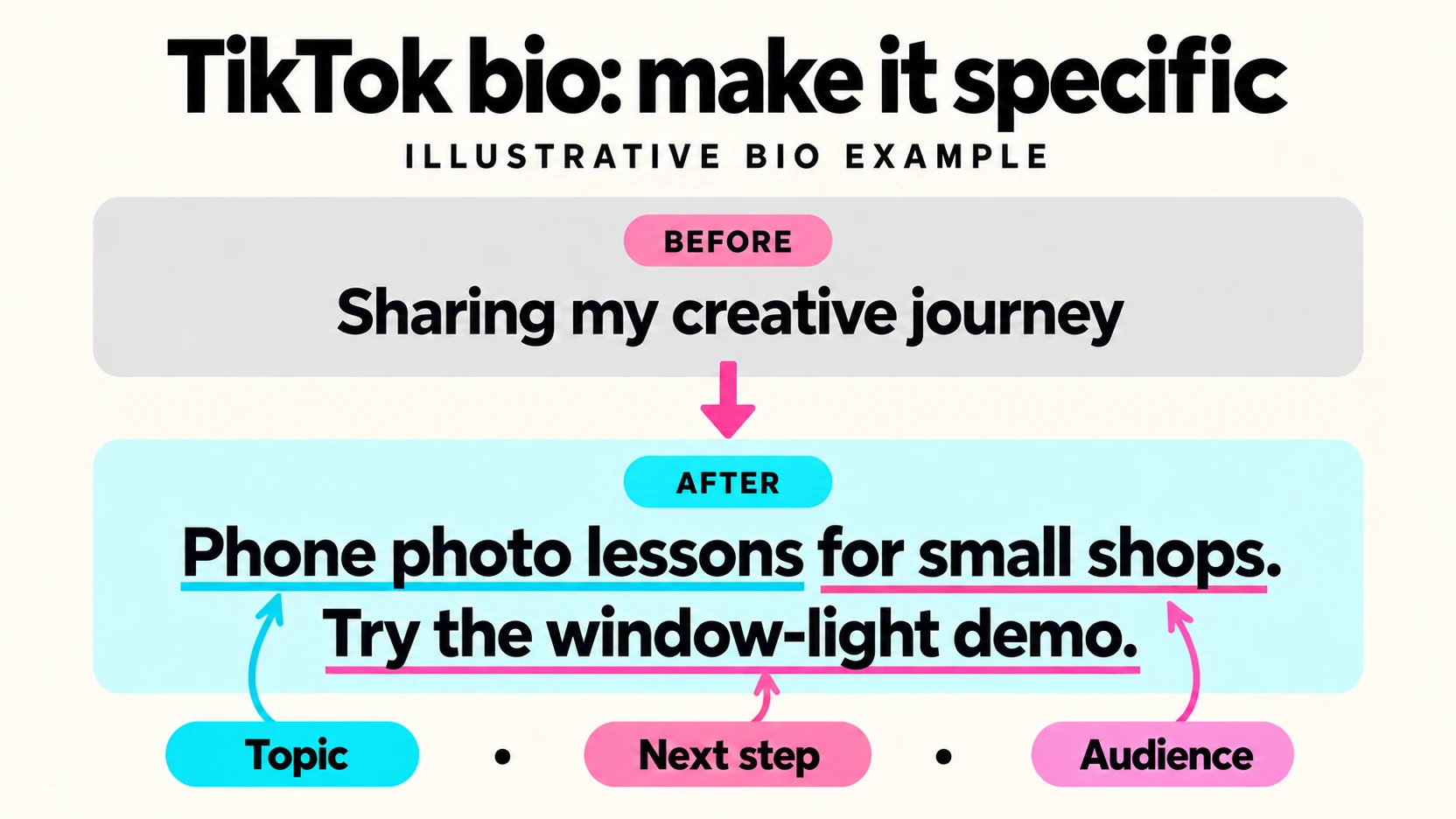
Consider a hypothetical photographer whose bio reads, “Sharing my creative journey.” The sentence says something about the person, but leaves visitors guessing about the content. It could describe painting, music, or travel just as easily.
The first example solves that problem: “Phone photo lessons for small shops. Try the window-light demo.” It names the subject, identifies the audience, and points toward one useful video. A newcomer can tell what the account teaches and which video to watch first.
To adapt it, write down the questions your last few videos answered. Look for a common audience or task. Replace “phone photo lessons” with that task and “small shops” with the people you help. Add a next step only when it leads somewhere useful.
If your videos currently cover unrelated subjects, choose which subject you want to keep making. Our TikTok video ideas guide can help you plan useful demonstrations and recurring topics. The bio should describe a content direction you can maintain.
Check the length and save the right version
TikTok’s official instructions for changing a bio set an 80-character limit. Check the final text in the editor after adding your business name, location, or emoji. Short examples can become too long once you personalize them.
On desktop, TikTok gives this route: open TikTok, click your profile picture, select View Profile, choose Edit profile, open Bio, enter your text, and save. Its help page says this feature is unavailable on mobile web. Use the app or desktop when editing.
Keep the important words easy to read. Decorative characters can crowd a short description; a plain sentence is often easier to understand. If you use an emoji, let the surrounding words carry the meaning so the message still works without it.
Make the next step possible
“Book a consultation” needs a working booking route. “Start with the tutorial” needs an identifiable tutorial. Before saving either instruction, follow it yourself from the public profile and check that the promised destination is available.
If your account has a website field, check its destination on a phone. If it does not, choose an action someone can complete within your profile, such as watching the demonstration you named. Avoid an arrow pointing toward a link that visitors cannot see.
Read the bio beside your recent videos. A clear introduction to beginner guitar lessons feels confusing above unrelated clips. Either revise the description or publish content that supports it. Matching those expectations gives visitors a concrete reason to consider following.
Treat a posting schedule as a promise. If you cannot reliably publish every day, leave “daily” out. Likewise, do not add “award-winning,” a customer count, or a professional credential unless you can substantiate it. Specificity helps only when the detail is true.
Keep temporary offers in a version you can update. Write a reminder to remove a launch date or expired discount. An evergreen description is easier to maintain than one built around an announcement that has already passed.
Prepare the profile before promoting it
A clear bio explains what an account offers; added followers increase the count visitors see. If you choose to buy real TikTok followers, our service takes a public TikTok username and adds followers from real profiles without requiring your password. Prepare the description and useful videos first.
The service adds followers to the account. Whether people watch future videos, ask questions, or become customers depends on their subsequent choices. Keep campaign dates separate from bio revisions so you do not credit every change in activity to a sentence you edited.
Save a dated copy of the current bio before replacing it. Ask someone unfamiliar with your account what content they expect after reading the new version. If their answer matches your videos, you have a clear introduction to work with.