
YouTube Like-to-View Ratio: What Counts as Good?
Your latest video earned more likes than the previous one, yet its like rate fell. Should you change the content? Before deciding, check what grew faster: likes or views. The same percentage can describe very different outcomes.
A good YouTube like-to-view ratio is useful evidence of response when compared with similar uploads. It is not a universal score for video quality. Here is how to calculate it, choose a sensible benchmark, and decide what deserves attention.
What counts as a good ratio?
For a numerical reference, OverseerOS reported a 2.92% median across 3,292 long-form videos at least 90 days old from 89 selected channels. That is roughly three likes per 100 views. The sample excluded videos with zero recorded likes, so it does not represent every upload or supply a target for Shorts.
Your own comparable videos give you a more relevant starting point. If recent tutorials usually receive two likes per 100 views, a new tutorial receiving three deserves a closer look. Check whether people also watched the explanation and asked useful questions before repeating its approach.
Calculate likes per 100 views
Divide likes by views, then multiply by 100. For example, 30 likes divided by 1,000 views gives 0.03; multiplied by 100, that becomes 3%. Keep both counts beside the percentage so you can see the scale behind it.
This measures likes per 100 views. It does not tell you what percentage of unique people liked the video, because views and unique viewers are different measurements. With zero views, the ratio is undefined; wait for usable data.
Also check the report name. YouTube Studio’s Likes (vs. dislikes) report compares positive and negative ratings. A high percentage there does not mean most views produced a like. You need the likes and views counts for this calculation.
Check which views you are comparing
There is an important date boundary for older benchmarks. YouTube says that, starting August 24, 2026, views across formats count from the first frame. Its previous view definition is now called an engaged view: someone clicks to watch or continues beyond the initial seconds.
That changes how you should read historical comparisons. Dividing the same likes by a larger view count produces a lower percentage. It does not, by itself, show that the content became less useful.
Label your spreadsheet column either views or engaged views, depending on what you actually use. Never silently switch between them. Keep comparisons on the same definition and note the measurement dates. YouTube says this counting change did not change its recommendation system.
Build a benchmark you can reproduce
Choose several recent uploads with a similar purpose, format, and length. Compare tutorials with tutorials; keep Shorts separate from longer demonstrations. Pick the same stage after publication, such as each video’s first seven days, rather than comparing a new upload with another video’s lifetime totals.
In YouTube Studio, open Analytics and choose Advanced Mode or See More. YouTube’s Advanced Mode guide explains how to select videos, change dates, add metrics, and export a report. Use likes and views from the same period and source.
Record the video title, format, measurement window, likes, views, and calculated percentage. Add a short note about any promotion. This gives the next comparison enough context to be useful without building a complicated dashboard.
Small totals also make percentages jumpy. Two likes from 20 views and 200 likes from 2,000 views both produce 10%, but the first figure can move sharply after a handful of additional views. Keep recording both raw counts instead of judging a new upload immediately.
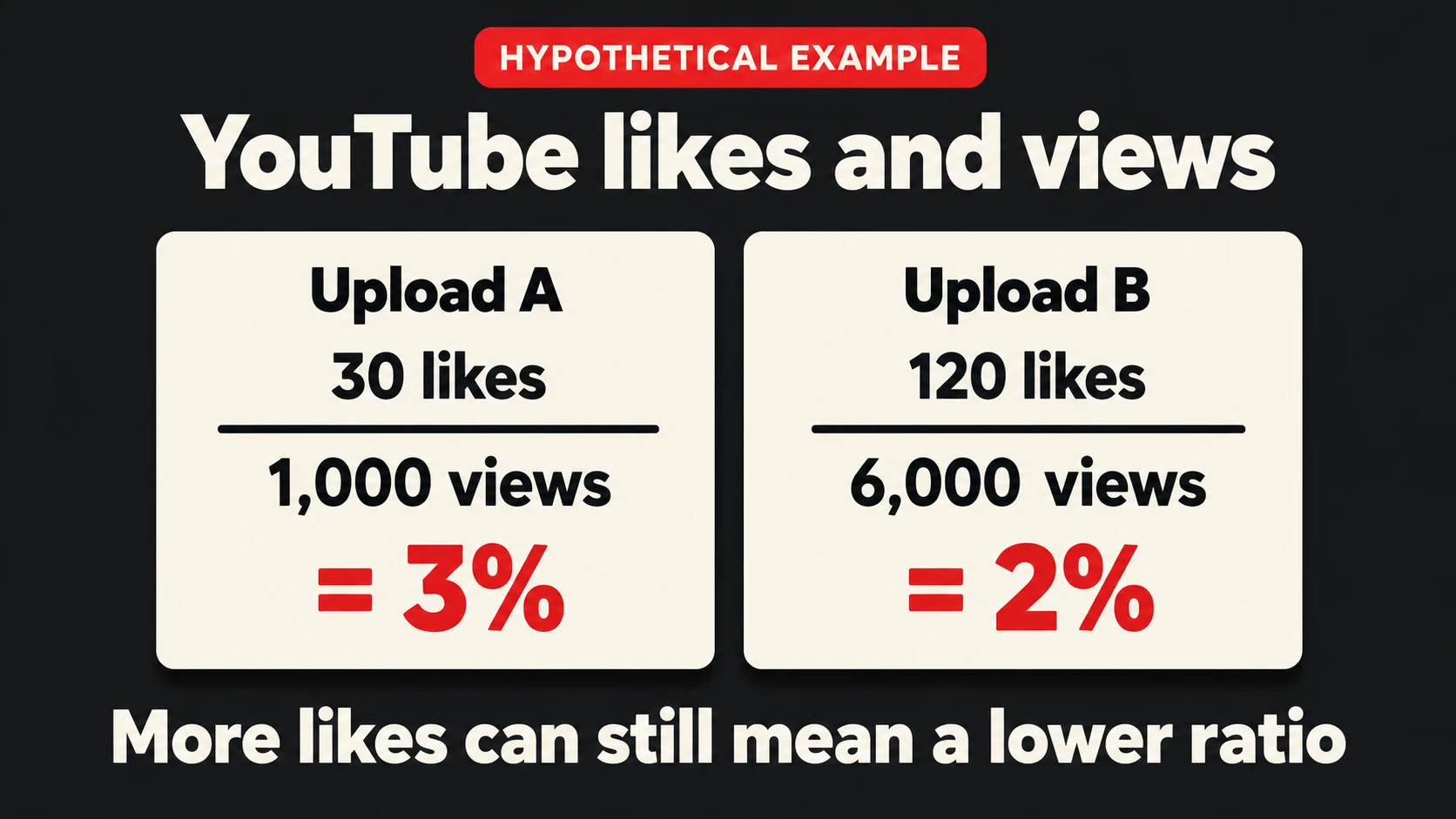
For a combined rate, add the likes and views first. In our hypothetical example, Upload A has 30 likes and 1,000 views; Upload B has 120 likes and 6,000 views. Together, they have 150 likes across 7,000 views, or about 2.14%. Simply averaging their 3% and 2% rates would give 2.5%, treating unequal view counts as equal.
Turn the comparison into an editing decision
Upload B’s lower percentage comes with four times as many likes and six times as many views. Those totals deserve attention alongside the rate. The numbers alone cannot explain why the audience responded differently, so use them to choose your next question.
- More views, lower ratio: inspect traffic sources and retention before changing the subject. The video may be reaching people with different interests.
- Higher ratio, fewer views: read comments for what people valued, then review whether the title clearly communicates that value.
- Lower ratio and weaker retention: watch the opening again. Check whether it delivers the demonstration or answer promised by the title.
For Shorts, our YouTube Shorts analytics guide explains the additional viewing signals worth checking. For any format, make one deliberate change before comparing the next similar upload.
Suppose a tutorial promises to fix blurry product photos. If viewers leave before the camera setting appears, move that demonstration earlier in the next version. If they stay but ask which setting to choose, add a clear comparison showing when each option applies.
Place a request for likes after a useful moment. After demonstrating a fix, invite viewers to like the video if the explanation helped. Let the demonstration earn that request; repeating it throughout the video adds no instructional value.
Keep promotion visible in your analysis
Likes make positive responses visible. YouTube also lists them among its recommendation signals, alongside viewing history and other feedback. That does not establish a like-rate threshold that unlocks more reach.
If you choose to buy YouTube likes, our service adds likes from real YouTube accounts to the public video you select. It can support visible activity around a prepared video. Record the campaign’s timing and starting counts, then review watch time, comments, and inquiries separately. Added likes do not establish that viewers watched longer or became customers.
For your next upload, choose the comparison videos before publishing and set a review date. Keep the counts, ratio, and one content observation together. You will have a clearer reason for the next edit than a percentage alone can provide.