
To change your Facebook Page username, open Facebook on a computer, switch into your Page, and go to Settings, Page setup, then Name. Edit the username and save it. You need Facebook access to the Page; task access alone does not allow this change.
The setting is small, but its address can appear everywhere: on your website, in customer emails, and on packaging. A handle that still contains an old business name makes those connections harder to recognize. Before choosing a replacement, work out which address customers should see and where you will need to update it.
Change the username from your Page settings
Use a computer for this process. Meta’s Page username instructions specify that requirement. The steps below apply to a business Page, so first check that you have switched out of your personal profile.
- Click your profile photo, choose See all profiles, and select the Page you manage.
- Open the Page’s profile menu. Choose Settings and privacy, then Settings.
- Select Page setup, then Name.
- Under General Page settings, find Username and click Edit beside it.
- Enter your replacement username, check the spelling, and select Save changes.
After saving, open the public Page and copy its address. Check that the handle matches what you entered before sending that link to anyone. Keep a note of the previous address for your link checks later.
Separate the Page name, username, and address
These labels describe different things. The Page name is the business name visitors read. The username is its handle. That handle also forms part of the Page’s web address, as Meta explains in its username setup guide.
Consider a fictional bakery that started as Alder Bakes and now trades as Alder Oven. Its Page might display “Alder Oven” while the handle still reads @AlderBakes2021. A proposed replacement, @AlderOvenBakery, tells customers which business they have found. These names illustrate the choice; their availability has not been checked.
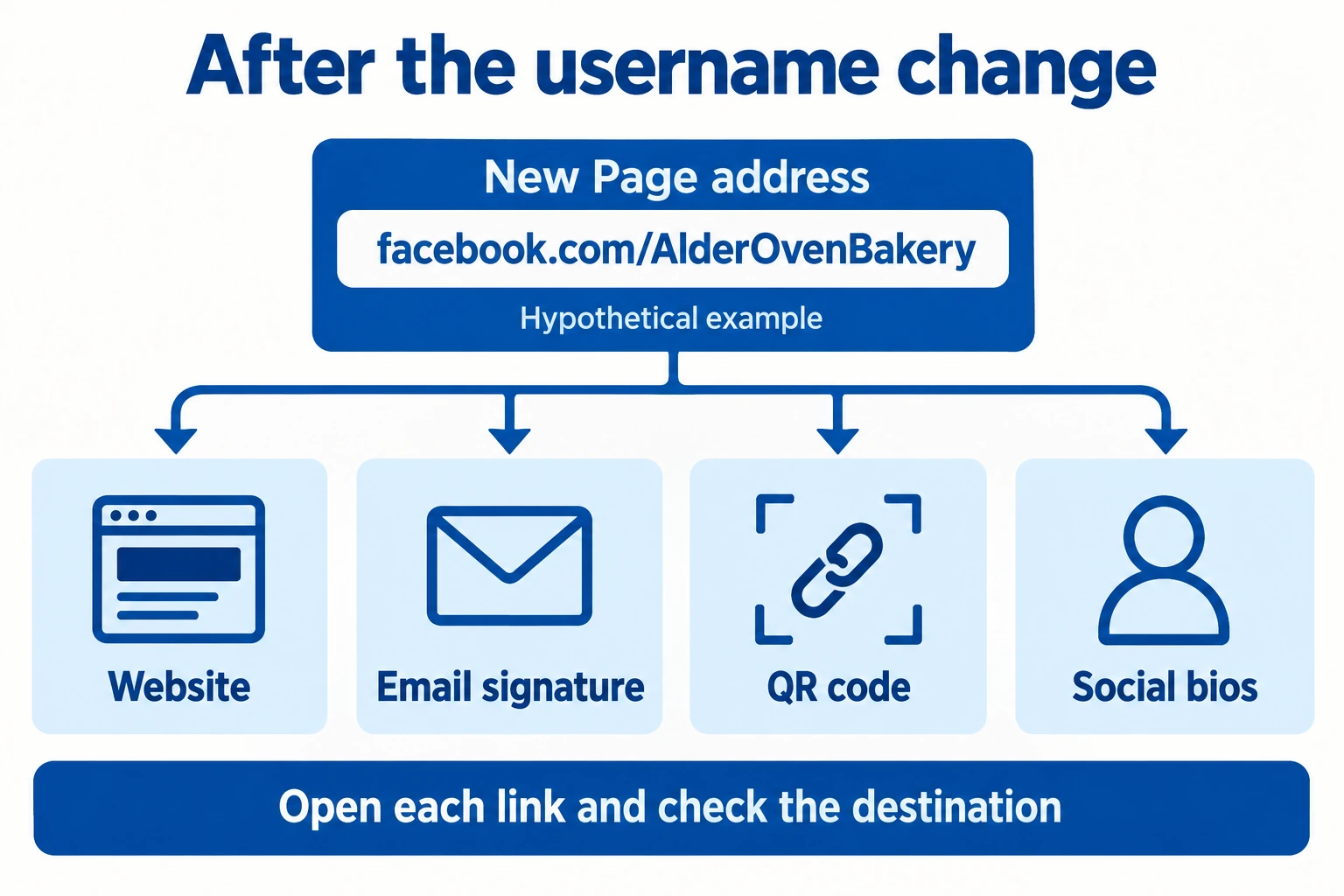
The corresponding example address would be facebook.com/AlderOvenBakery. Changing the displayed Page name is a separate task. Check both fields during a rebrand so you do not fix the address while leaving the old shop name above your posts.
Say the proposed handle aloud. Could a customer type it after hearing it once? Avoid a year unless it belongs permanently to the brand. A meaningful word such as “Bakery” usually explains more than a string of spare digits.
Choose a handle Facebook can accept
Facebook’s custom username guidelines allow letters, numbers, and periods, with a minimum of five characters. Spaces and underscores are outside that allowed set. Generic terms and domain extensions are also excluded.
Capital letters and periods do not create a different username. AlderOvenBakery and alder.oven.bakery would count as the same choice. If someone already uses the handle you want, changing its capitalization will not make it available.
Keep the business recognizable when you try another option. For the fictional bakery, AlderOvenBread could be a sensible candidate if bread is central to the business. Adding a city could work for a single local shop, but consider whether that label will still fit if you expand.
Write two or three candidates before editing. Compare them with the name on your storefront, website, and other social profiles. Consistency helps people recognize the business across those places. It does not establish ownership of a handle or guarantee Facebook will accept it.
If the username will not save
Start with the message Facebook displays. An unavailable name, a formatting problem, and a missing permission need different responses. Record the exact message before trying another change.
If you cannot reach the setting, check your access with the person who manages the Page. Someone who handles ads or content through task access may still lack the Facebook access needed here. Ask the appropriate Page manager to make the change.
If you are creating the first username for a new Page, Meta says the option may not be available immediately. Its setup guidance does not promise a waiting period. Avoid planning a print run around an address until Facebook accepts it and you have opened it successfully.
Check every route customers use to reach the Page
Saving the username finishes the setting change. Your next job is to check the links outside Facebook. Do not assume an old address will keep directing visitors correctly; test the links that matter to your business.
- Open your website’s Facebook icon and confirm it reaches the intended Page.
- Replace the address in your email signature, then send yourself a test message and click it.
- Check social profile links and business listings that include your Facebook address.
- Scan printed QR codes with a phone. If a code points somewhere wrong, update its managed destination or replace the printed code.
For Alder Oven, the packaging card deserves particular attention: customers may keep it long after the website has changed. Test one existing card before ordering the next batch. A spreadsheet with the link location, destination, person responsible, and check date is enough to track the work.
Check the destination behind each link, not just its visible text. An email can display your new handle while its hyperlink points to the old address. A QR code can hide the same mismatch from customers.
Give visitors a reason to stay
Once the address works, review the Page as a customer. Confirm the business description, contact details, and recent posts explain what you offer. The bakery could pin a current menu or a post about ordering, with a clear next step.
If you plan to buy Facebook followers, use the verified public Page address. Boost Social Media’s packages add likes and followers, giving the Page a larger visible audience count. Keep a current menu and useful posts alongside that number so visitors can understand what your business currently offers.
Finish by giving a colleague the updated link. Ask them to open it on their phone and find your contact information. That simple check catches a wrong destination or an incomplete Page before customers have to tell you.